

Índice do artigofaltam 14 min de leitura
Choosing a gateway is not "just plugging in payments". The choice shapes UX, approval rates, fraud risk, financial reconciliation and even whether your app passes (or fails) store review.
This article is for people who want to make a practical decision, without jargon and without becoming "hostage" to a provider. You will leave with a clear checklist, an understanding of the integration options and a provider comparison you can use to talk confidently with your team (or your vendor).

What you will find here
- First filter: what you sell in the app (and when you must use the store's own payment system).
- Decision checklist: questions that prevent rework.
- Integration models (hosted checkout, API, payment link) with pros and cons.
- How to compare fees without falling into traps.
- A comparison of common options (Brazil and multi-country), with real project notes.
- Sandbox/testing: how to test safely.
- "Paid / not paid": how to validate correctly for Pix (Brazil's instant payment system), boleto (a Brazilian bank payment slip) and cards.
Short answer
If the app sells digital content consumed inside the app, start with Apple's and Google's rules. In-App Purchase and Google Play Billing are still the foundation. On iOS, since June 18, 2026, Brazil also allows offering another payment method or a link to your website, always alongside Apple's purchase option. In that case the gateway is back on the table, but as an extra option, with its own commission.
If the app sells physical products, external services, marketplace transactions, bookings, deliveries, B2B billing or subscriptions outside the store, the decision becomes about the gateway/PSP, backend, webhooks, anti-fraud, reconciliation and payout model.
The most expensive mistake is picking a gateway by name before deciding what the app sells, who gets paid, which payment methods are mandatory and how the backend will confirm that the payment actually happened.
Quick matrix: which path to take
| App scenario | Most likely path | Critical point |
|---|---|---|
| Premium subscription, digital content, virtual currency or feature consumed in the app | Store payment (on iOS in Brazil, with an optional alternative alongside) | Check Apple's and Google's rules and compare the commission of each path before designing an external checkout. |
| Sale of physical products, in-person services, deliveries or bookings | Traditional gateway/PSP | Pix, cards, boleto, webhooks and reconciliation in the backend. |
| Marketplace with multiple sellers or service providers | Gateway with split payments/sub-accounts | KYC, payouts, commission, advance payments and chargeback liability. |
| MVP, pre-sale or assisted sale | Payment link or hosted checkout | Less development now, but less control over UX and automation. |
| App with a strategic, high-volume purchase funnel | API + custom checkout | More control over conversion, but more technical responsibility and support. |
| Recurring billing outside the stores | Gateway with recurring billing | Retries, delinquency, cancellation, invoicing and customer communication. |
If the project combines an app, a backend and payments, cross-check this decision with how much it costs to build an app, web system, web app and split payments for marketplaces.
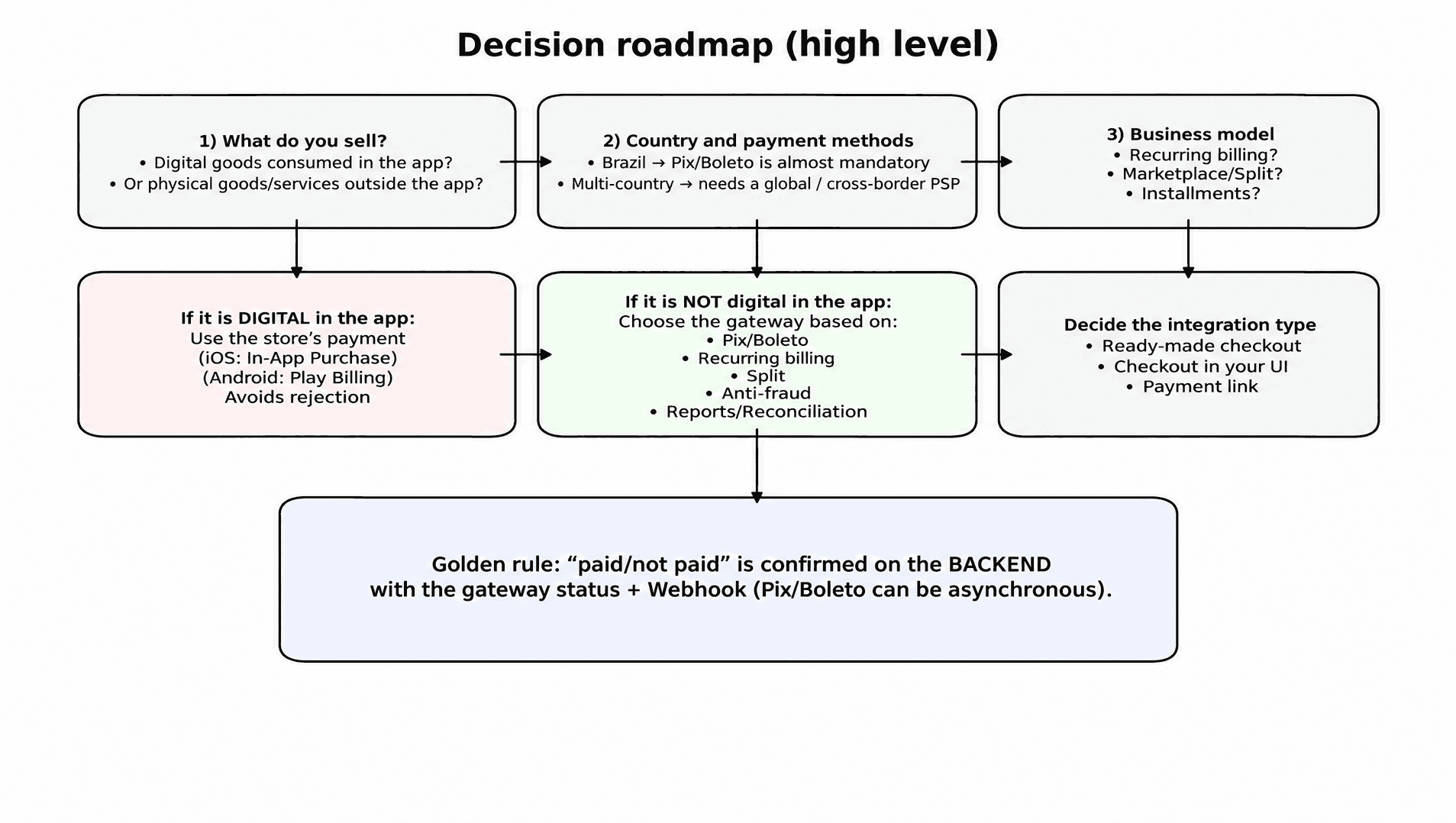
1) Before choosing any gateway: what do you sell in the app?
This is the point that causes the most store rejections and technical rework.
If your app sells digital content consumed inside the app (e.g. content subscriptions, premium features, virtual currency, digital items, etc.), the general rule is:
- iOS (Apple): you must offer In-App Purchase. In Brazil, it can come with an alternative (see below).
- Android (Google Play): you must use Google Play Billing for in-app purchases of digital goods/services. Google's billing choice program exists, but in November 2026 its official page lists the United Kingdom, the European Economic Area, Japan and Australia, and does not include Brazil.
If you try to sell digital goods "on the side" through a traditional gateway without following these rules, the app may be rejected or forced to change the flow.
What changed on iOS in Brazil (June 2026)
On June 18, 2026, together with iOS 26.5, Apple announced changes for App Store apps in Brazil. For digital goods and services, developers can:
- include another payment method inside the app (for example, your gateway with Pix or cards);
- add a link to your website to complete the purchase;
- or do both.
The rules that weigh on the decision:
| Point | How it works now |
|---|---|
| Apple purchase | Still mandatory: the alternative always appears alongside In-App Purchase |
| App Store commission on digital goods | 10% for the vast majority of developers, or 21%, depending on the case |
| Processing by Apple | An extra 5% when the user pays through In-App Purchase |
| Sale completed on the linked website | 15% commission, or 10% in qualifying programs and for subscriptions after the first year |
| Refunds | For purchases made outside Apple, Apple does not issue refunds: customer service is on you |
| Apps in the Kids category | Cannot send users to a website to complete the purchase |
| Users under 18 | Cannot be sent to the external link; purchasing through the alternative method requires a control involving a parent or guardian |
In practice: the gateway becomes a real option for digital goods on iOS too, but it does not remove Apple. The math is to compare what is left on each path (Apple's commission, gateway fee, support and refunds on your side) and how much of your user base will choose the alternative. Check Apple's current rules before designing the flow, because percentages and conditions change by program.
On the other hand, if you sell physical goods or services consumed outside the app (e.g. delivery, transportation, in-person events, a subscription to a physical service), you normally can use traditional gateways.
Simple rule for non-technical readers:
- Digital inside the app → store payment (on iOS in Brazil, with the option of offering your gateway or link alongside).
- Physical / service outside the app → "regular" gateway.
2) Quick glossary (in plain language)
You will hear a few terms. Here is a direct translation:
- Gateway/PSP (Payment Service Provider): the platform that processes the payment and gives you APIs, checkout, webhooks, reports, etc. (it often does "everything in one place").
- Acquirer: the "card machine of the online world": the party that connects the transaction to card networks and issuers. Some providers are acquirers; others use acquirers underneath.
- Anti-fraud: a layer that helps reduce fraud and chargebacks (it can come from the provider itself or a third party).
- Split/Marketplace: a feature to divide the payment (commissions and payouts) among more than one recipient.
- Sandbox/Testing: a test environment (no real money) to validate the integration and flows.
If you do not remember these names, that is fine: what matters is understanding the practical effect of each one on your operation.
3) Decision checklist (the right questions)
Use this checklist before "choosing by name" (or by price).
| Question | Why it matters | Sample answers |
|---|---|---|
| Do you sell digital goods consumed in the app? | May require payment through the store | "Premium subscription in the app" |
| Is the app Brazil only or multi-country? | Determines Pix/boleto and currency support | "Brazil only" / "LatAm" / "Global" |
| Which payment methods are mandatory? | Affects conversion | "Card + Pix + boleto" |
| Do you need installments? | Changes UX, reconciliation and chargebacks | "3 to 12 installments" |
| Is there recurring billing (subscription)? | Changes the entire billing architecture | "Monthly/annual" |
| Is there a marketplace/split? | Defines sub-accounts, payouts and KYC | "Multiple sellers" |
| Who needs to get paid first? | Defines automatic vs manual split | "Platform retains its commission" |
| Do you need anti-fraud? | Reduces chargebacks and losses | "Yes, high ticket" |
| Do you need simple refunds/cancellations? | Support and reputation | "Refund within 7 days" |
| How will reconciliation work? | Prevents "missing payout" problems | "Monthly close" |
| Hosted or custom checkout? | Time to market vs UX control | "I want it fast" / "I want my own UX" |
| Does the team know webhooks and statuses well? | Prevents payment bugs | "Yes / No" |
Key tip: if you cannot answer these questions in a 30-minute meeting, you are not "buying a gateway" yet: you are buying risk.
4) Integration models (and how they affect timeline and risk)
There are three common paths. They are not "better/worse"; they are choices with trade-offs.
4.1 Hosted checkout (hosted page / redirect / modal)
You use the provider's interface (a ready-made screen) and only receive the result.
Advantages:
- Faster to implement.
- Less responsibility for sensitive data.
- Usually comes with conversion improvements "out of the box".
Disadvantages:
- Less control over UX and layout.
- May "break" the experience (redirects or opens a webview).
4.2 Checkout inside your app (API + custom UI)
You build the flow/UX and use the provider's API to process the payment.
Advantages:
- Full control of the UX.
- You can optimize conversion and the purchase funnel.
Disadvantages:
- More complex integration.
- Requires more care with security and validation (especially through the backend).
- Usually increases maintenance cost.
4.3 Payment link (simplest flow)
You generate a link (through the provider) and the user pays on a ready-made page.
Advantages:
- Excellent for MVPs, assisted sales, support and cases "outside the app".
- Almost zero development.
Disadvantages:
- Less integrated into the app's funnel.
- Relies more on manual operations.
5) Fees and costs: how to compare without falling into traps
Many people choose a gateway by looking only at "the card fee". That is not enough.
Real costs usually come from a bundle of decisions:
- cards (approval, chargebacks, installments);
- Pix (Brazil's instant payment system: conversion and confirmation);
- boleto (a Brazilian bank payment slip: confirmation time and abandonment);
- recurring billing (delinquency, retries);
- split/marketplace (payouts, KYC, sub-accounts);
- anti-fraud (cost vs loss reduction).
Checklist of what to compare (no numbers):
| Item | What to ask (in practice) | Why it changes everything |
|---|---|---|
| Card (credit/debit) | Does it support capture/authorization? tokenization? 3DS? | Affects approval and risk |
| Pix | Does it confirm in real time? Dynamic QR code? | Affects conversion and UX |
| Boleto | Clearing time and expiration | Affects abandonment and support |
| Installments | Who absorbs the interest? How is it reconciled? | Affects payouts and "missing money" |
| Chargebacks | Dispute process and costs | Affects margin and support |
| Refunds | Full/partial? How is it notified? | Affects the app's reputation |
| Recurring billing | Automatic retries? Dunning? | Affects churn and delinquency |
| Marketplace/split | Does each seller need an account? KYC? | Affects seller onboarding |
| Reports | Statements, payouts, reconciliation | Avoids spreadsheets and disputes |
Tip for clients: ask your vendor for a proposal with scenarios (e.g. simple sale vs subscription vs marketplace). A gateway can be great for one scenario and bad for another.
6) Provider comparison (Brazil and multi-country)
The table below is not a "ranking". It is a map to help you choose by scenario.
Important: features may vary by contract, country and account type. Use it as guidance and validate with your vendor before signing.
6.1 Common platforms in Brazil (Pix + boleto + cards)
| Provider | Where it usually fits well | Pix/Boleto | Recurring | Split/Marketplace | Anti-fraud | Practical note |
|---|---|---|---|---|---|---|
| Mercado Pago | B2C and B2B with hosted checkout or API | Yes | Depends on the product | Yes | Provider's own layers | Good for starting fast with hosted checkout and webhooks |
| PagBank (PagSeguro) | E-commerce/apps with a variety of payment methods | Yes | Yes | Yes | Yes (anti-fraud protection) | Split may require accounts for everyone involved |
| Pagar.me (Stone) | Platforms/marketplaces with split rules | Yes | Yes | Yes (Pix and recurring) | Integrates with the client's strategy | Good when you need to control rules and events via webhooks |
| iugu | Recurring billing and B2B integrations | Yes (Pix Cobrança) | Yes | Yes | Depends on the scenario | Strong in recurring billing and automation; requires good status design |
| Asaas | Billing, subscriptions and financial automation | Yes | Yes | Yes | Depends on the product | Widely used when "finance" is part of the product |
| Efí Pay (Gerencianet) | Pix/boleto/cards with split | Yes | Depends on the product | Yes | Depends on the product | Split is usually between Efí accounts |
6.2 Global and cross-border PSPs (when you operate in more than one country)
| Provider | Best for | Brazil (Pix/Boleto) | Marketplace/Split | Anti-fraud | Practical note |
|---|---|---|---|---|---|
| Stripe | Multi-country digital/physical products; mature APIs | Supports Pix and boleto (depending on region/account) | Stripe Connect | Stripe Radar | Strong in APIs, webhooks and ecosystem; good for global products |
| Adyen | Larger/enterprise operations; multiple local methods | Yes (Pix and boleto) | Platforms (split) | RevenueProtect | Good for consolidating payments and managing risk/disputes |
| EBANX | Companies selling into LatAm (cross-border) | Yes (Pix and boleto) | Depends on the model | Depends on the product | Focused on local methods and conversion in Latin America |
| dLocal | Cross-border with local methods in LatAm | Yes (Pix and boleto) | Depends on the model | Depends on the product | Useful when "local payments" are a pain point in the country |
| PayPal / Braintree | PayPal wallet, cards and local methods under one contract | Depends on the country | Depends on the model | Provider's own tools | Good for international audiences and the "PayPal" UX |
| Verifone 2Checkout | International companies selling into Brazil with boleto/Pix | Yes (Boleto/Pix) | Depends on the model | Depends on the product | Option for international e-commerce with Brazilian payment methods |
6.3 Acquirers and transactional APIs (when you have a more "enterprise" setup)
| Provider | When it makes sense | What it delivers | What you need on "your side" |
|---|---|---|---|
| Cielo (e-commerce API) | Higher volume, Brazil operations, need for modules | Cards, Pix, boleto, e-wallets; tokenization; pluggable anti-fraud | A team to run anti-fraud, reconciliation and rules |
| Stone Online | When you want a "transactional layer" and already have a stack | Authorize/capture/cancel/query transactions | Anti-fraud, multiple methods, recurring billing and UX usually stay with you |
| Getnet | E-commerce/marketplaces focused on acquiring and APIs | Checkouts/APIs; marketplace API; notifications | Governance of payments and payouts |
| Rede | Brazil operations with acquiring and integrations | APIs and authentication (OAuth) | Structure to run the rest of the stack |
7) Pros and cons (quick summary by provider)
Use this part to "make the final call" once you know your scenario.
Mercado Pago
Pros:
- good for starting fast (hosted checkout + API);
- strong for Pix/boleto/cards in Brazil;
- webhooks well known in the market.
Cons:
- depending on the model, you may have less fine-grained UX control;
- marketplace/split features require careful payout design.
PagBank (PagSeguro)
Pros:
- variety of methods (cards, Pix, boleto) and complementary features;
- split and recurring billing appear as options in the ecosystem.
Cons:
- split tends to require onboarding/accounts for everyone involved;
- as with any provider, details vary by contract.
Pagar.me (Stone)
Pros:
- strong when you need events, webhooks and split rules;
- a good choice for platforms and recurring billing.
Cons:
- integration usually requires more technical discipline (statuses, events, idempotency).
iugu
Pros:
- widely used for recurring billing, boleto/Pix and financial automation;
- good for B2B models and billing.
Cons:
- requires good status and reconciliation design (especially with Pix/boleto).
Asaas
Pros:
- focus on billing and automation (subscriptions, charges, management);
- good for scenarios where finance is part of the product.
Cons:
- not always the best choice if your focus is "cards with maximum performance" (depends on your case).
Efí Pay (Gerencianet)
Pros:
- a good alternative for Pix/boleto/cards, including split.
Cons:
- split usually depends on Efí accounts for the recipients.
Stripe
Pros:
- very mature APIs and documentation;
- excellent for multi-country products;
- has solutions for marketplaces (Connect) and anti-fraud (Radar).
Cons:
- requires a minimum level of engineering maturity;
- availability of methods and features may vary by country/account.
Adyen
Pros:
- strong for large/enterprise operations;
- many local methods, split and risk/dispute tools.
Cons:
- onboarding and negotiation tend to be more "corporate" (not always ideal for an MVP).
EBANX / dLocal (cross-border)
Pros:
- good when you need to sell in countries where running local methods is hard;
- they usually focus heavily on conversion with local methods.
Cons:
- may be "too big" for a small operation;
- depend on your model (domestic vs cross-border).
PayPal / Braintree
Pros:
- PayPal is known worldwide;
- Braintree usually brings cards, wallets and local methods into one integration.
Cons:
- for Brazil, check whether it supports Pix/boleto in your model (it is not always the main focus).
Verifone 2Checkout
Pros:
- an alternative for international sellers that need to accept Brazilian boleto/Pix.
Cons:
- usually makes more sense for cross-border than for a 100% Brazilian company.
Cielo / Stone Online / Getnet / Rede (acquiring)
Pros:
- may make sense for larger operations in Brazil that need modules and control.
Cons:
- you usually need more "stack" around them (anti-fraud, split, reconciliation, UX);
- implementation tends to be more work than an "all-in-one" PSP.
8) What the client needs to open an account and sign up (checklist)
Here is a checklist that reduces back-and-forth and speeds up implementation. You can copy and paste it into an email to your finance/legal team.
| Item | Who usually handles it | Note |
|---|---|---|
| Business account with the provider (CNPJ, Brazil's company tax ID) | Finance/Legal | Usually requires KYC (company documents) |
| Bank account to receive funds | Finance | Confirm ownership |
| Define the model: simple sale vs marketplace | Product/Finance | Marketplaces usually require sub-accounts and split rules |
| Define methods: cards, Pix, boleto, installments | Product | Affects UX and reconciliation |
| Define the refund/cancellation policy | Product/Support | Important for reputation and disputes |
| Define who monitors reports | Finance | "Who checks whether the money arrived?" |
| Approval of the recurring budget | Leadership/Finance | Fees vary with volume, chargebacks and advance payments |
| Share integration credentials securely | IT/Product | Ideally: a dedicated user + the minimum necessary permissions |
9) Sandbox/testing: how to test without fear (before launch)
Payment integrations usually fail not because of "bugs" but because of a lack of scenario testing.
Minimum test checklist:
- approved payment (card);
- declined payment (card);
- full and partial refund;
- Pix paid immediately and Pix paid late;
- boleto generated and paid later (status pending → paid);
- out-of-order webhook (arrives duplicated / arrives late);
- attempt to "pay twice" (idempotency);
- reconciliation: what shows in the dashboard vs in your system.
Simple rules to avoid pain:
- treat the sandbox like a real environment: webhook + backend + database;
- never validate a payment "only in the app";
- keep event logs (for auditing and support).
10) "Paid / not paid": how to validate correctly (and avoid fraud and bugs)
This is the most important part of the article.
In real projects, the biggest problems come from two situations:
- Pix/boleto are asynchronous (they can take time to confirm).
- The user may close the app in the middle of the flow, and the payment may still go through.
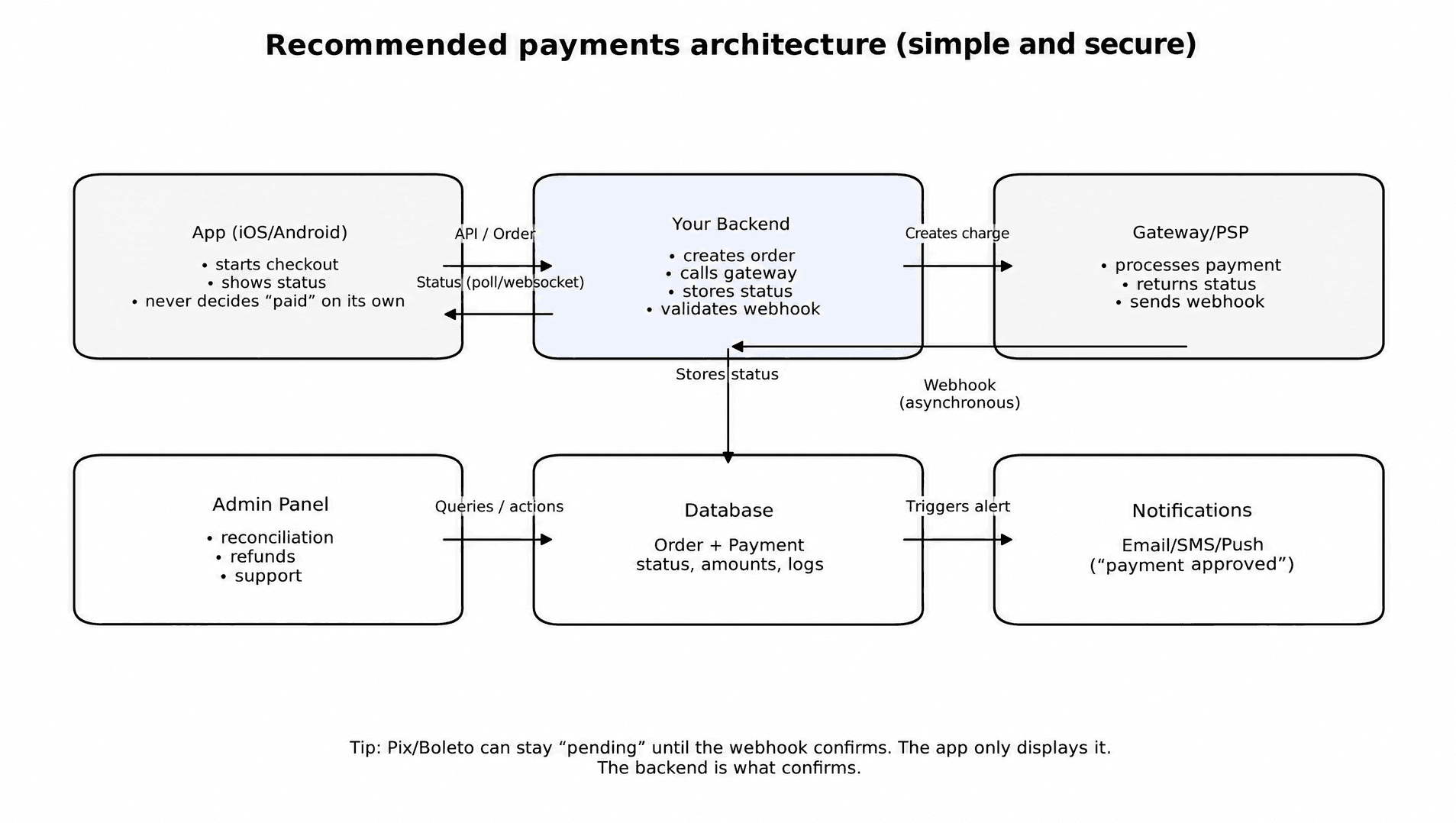
The recommended architecture is always this:
Recommended flow (step by step)
- The app creates an order in the backend (e.g. "Order #123").
- The backend calls the provider and creates the charge (card/Pix/boleto).
- The backend saves the payment as pending.
- The provider sends a webhook confirming the status change (paid/declined/refunded).
- The backend validates the webhook signature and updates the status in the database.
- The app only queries and displays the status (e.g. "awaiting payment" → "approved").
Golden rule: the backend decides whether it was paid. The app only displays it.
Typical statuses (so you can talk to the team without confusion)
| Status (example) | What it means | Action in the app |
|---|---|---|
| Pending | Awaiting payment (Pix/boleto) | Show "awaiting" |
| Authorized | Card authorized (can still be captured) | "Processing" |
| Paid / Captured | Payment confirmed | Release access/delivery |
| Declined / Failed | Did not pay | Show the error and allow retry |
| Refunded / Reversed | Payment returned | Adjust access and notify |
| Chargeback / Dispute | Card dispute | Open a support flow |
11) Common mistakes (that turn into rework and arguments)
- Choosing a gateway before deciding on Pix/boleto, recurring billing, split and country.
- Trusting the app to mark "paid" (this opens a fraud loophole and creates inconsistencies).
- Not configuring webhooks (or not handling duplicates and redelivery).
- Ignoring that a boleto can take hours or days to confirm.
- Not planning reconciliation (when finance starts asking, it becomes a crisis).
- Launching a marketplace without automatic split (it becomes spreadsheets + payout disputes).
- Not planning for refunds/cancellations from the start.
12) A simple path to decide (without stalling the project)
If you want a practical "shortcut":
- Selling digital goods in the app?
Start with the store payment (iOS/Android). On iOS in Brazil, then decide whether it is worth also offering your gateway or a link to your website: compare the commission on each path and remember that users under 18 and apps in the Kids category cannot go to the external link. On Android, stick with Google Play Billing.
- Selling outside the app and only in Brazil?
Prioritize a provider with Pix + boleto + cards + well-documented webhooks.
- Will there be a marketplace?
Choose a provider with split/sub-accounts and define the payout rules before launch.
- Will you sell in more than one country?
Consider a global PSP or a cross-border provider with local methods.
If you follow this roadmap, the rest becomes execution, not an "endless exchange of opinions".
FAQ: payment gateway for apps
What is the best payment gateway for an app?
There is no universal best gateway. The choice depends on country, Pix, boleto, cards, recurring billing, split, anti-fraud, volume, support, reconciliation and Apple/Google rules for the type of sale.
Can I use Pix or cards outside the App Store and Google Play?
It depends on what is being sold. For physical goods and services consumed outside the app, usually yes. For digital content, premium subscriptions and features consumed inside the app, the stores require native payment. Since June 18, 2026, on iOS in Brazil, you can offer Pix or cards through your gateway, or a link to your website, as long as In-App Purchase appears alongside; Apple also charges a commission on these paths, and the external link is not allowed for users under 18 or for the Kids category. On Google Play, the billing choice program does not list Brazil as of November 2026.
Can the app mark a payment as approved on its own?
No. The app should only display the status. The backend confirms the payment after receiving and validating the provider's webhook. This prevents fraud, duplicates and errors with Pix, boleto, cards and refunds.
When do I need split payments?
You need split payments when the payment must be divided among the platform, sellers, service providers, partners or commissions. In that case, the gateway needs to support sub-accounts, KYC, payout rules and reconciliation.
If payments involve personal data, anti-fraud, a gateway, an app store or transaction history, also review: Privacy Policy, Data Safety and App Privacy: what to prepare before publishing your app.


