Índice do artigofaltam 13 min de leitura
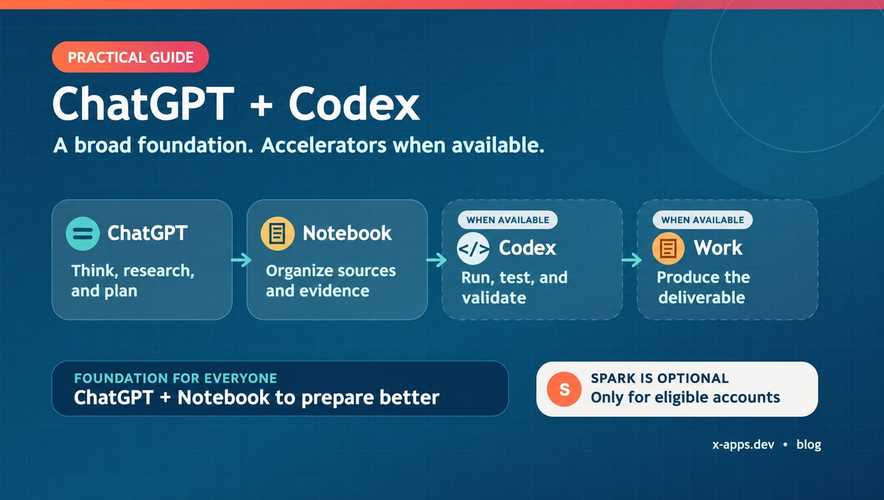
The rule of thumb for any plan: use ChatGPT to think and Gemini Notebook to organize sources. If your subscription includes Codex, use it to execute and validate software. Work comes in as an optional accelerator only when it is available on your account.
Having access to the most capable models does not mean you should use the most expensive mode or the highest reasoning effort on every task. In practice, the best way to get value from a ChatGPT subscription is to route each job to the right surface and reduce ambiguity before execution starts.
This discipline improves quality and preserves the allowance included in the plan. It also reduces the most common hidden cost in AI tools: spending several interactions correcting direction, re-explaining context or undoing an implementation that started too early.
This guide was published on July 21, 2026 and revised on November 10, 2026. That revision removed GPT-5.3-Codex-Spark, retired by OpenAI on September 14, 2026, and added the model lineup OpenAI currently recommends for Codex and Work. Features, models, limits and eligibility may change by plan, region, workspace and gradual rollout. For usage and balance, treat the Codex Settings → Usage panel on your own account as the source of truth.
The flow below has two layers. The first combines ChatGPT and Gemini Notebook and serves the broadest audience, including those who do not yet have Codex enabled on their account (on Free and Go it is rolling out gradually, only in the desktop app). The second adds Codex and Work when those features are part of the plan or enabled in the workspace.
Quick summary: which surface should you use?
| If you need to... | Start with... | Why |
|---|---|---|
| Ask a question, compare alternatives or organize an idea | Chat | Avoids starting execution before the problem is clear |
| Study many sources before deciding | Gemini Notebook or RAG | Filters and organizes knowledge before execution |
| Modify files, run commands, test and validate software | Codex, when included in the plan | Works in the real context of the repository |
| Make a small interactive code change | Codex with GPT-6 Luna | It is the most efficient model in the current lineup and suits focused programming |
| Produce a document, spreadsheet or presentation | Work, when available, or Chat | Separates research from the final deliverable |
| Repeat rules across all work in a project | AGENTS.md | Loads persistent instructions automatically |
| Repeat a procedure with its own steps and criteria | Skill | Turns a good process into a reusable workflow |
OpenAI itself distinguishes Chat, Work and Codex: Chat handles everyday conversations and questions; Work runs long jobs and creates deliverables; Codex remains specialized in development and technical work.
Chat, Gemini Notebook, Work and Codex are not the same thing
The first step to saving is to stop treating every surface as just a shortcut to the same chat.
Chat: think, research and prepare
Use Chat to:
- turn a vague idea into an objective;
- compare approaches;
- identify risks and assumptions;
- prepare acceptance criteria;
- review a prompt before execution;
- summarize context that will be sent to another tool.
Regular Chat remains subject to the limits of the chosen model and plan. The difference is that the agentic usage documentation lists Codex, Work, ChatGPT for Excel and Workspace Agents as features that share this structure when available. So don't treat the agentic usage bar as a universal meter for every ChatGPT conversation; always check the account panel. (Using Codex with your ChatGPT plan)
Work: run research and deliver the final file
Use Work when the request does not end in an answer but in a deliverable: a report, presentation, spreadsheet, document, recurring analysis or Site.
A question like "which topics should go into this report?" can start in Chat. But "analyze the sources, build the tables, produce the charts and deliver the document" is a job suited to Work.
Codex: act in the real technical environment
Use Codex when the task requires access to the repository, files, terminal, tests, documentation and tools. That is the context in which it can not only suggest code but implement and verify the result.
On the Codex pricing page checked on November 10, 2026, even the Free and Go plans show GPT-6 Luna in the desktop app, at standard speed and subject to gradual rollout. Plus includes Codex on the web, in the CLI, in the IDE extension and on iOS. The same page states that Work and Codex share the plan's usage. (Codex pricing)
Gemini Notebook: organize many sources before executing
Gemini Notebook, formerly known as NotebookLM, is useful for gathering documents, pages, transcripts and other sources before asking for an analysis or implementation. It does not replace ChatGPT or Codex: its main function is to reduce the volume of context and keep answers tied to the selected material.
This is the broadest path for any plan: organize the sources in the notebook, produce a verifiable summary and take only the necessary context to ChatGPT. When there is a programming task, the resulting briefing can be handed to the Codex available in the plan or to a technical team.
Codex-Spark: retired in September 2026
GPT-5.3-Codex-Spark was a research model aimed at near-real-time programming. During the preview, it had its own limits and was restricted to eligible Pro users. OpenAI retired it on September 14, 2026: it is no longer available in the ChatGPT desktop app, the Codex CLI or the IDE extension. If any saved configuration, custom agent or script still selects gpt-5.3-codex-spark, switch it to an available model. (Codex models)
The principle Spark served still applies: for a small change, narrow the scope, ask for the smallest possible diff and require the related tests. Today you do that in Codex with GPT-6 Luna, the most efficient model in the current lineup. If speed is the issue, Fast mode speeds up supported models but consumes the included allowance at 2.5 times the standard rate; in a guide about not spending more, it is a conscious exception, not the default. (Speed in Codex)
If Codex is not yet available on your account, use ChatGPT to prepare the briefing and hand execution off to the development environment or the responsible team.
The most economical strategy: think before executing
Waste begins when a still-ambiguous task goes straight into Codex or Work.
Questions like these should be answered first:
- What problem needs to change in the product?
- What is in and out of scope?
- Which files, modules or sources are relevant?
- What existing behavior must be preserved?
- Which risks and edge cases should be tested?
- What must be true to consider the task done?
The Codex best practices documentation recommends four elements in a good request: objective, context, constraints and definition of done.
Prompt to turn an idea into an implementation briefing
Turn the request below into an implementation briefing ready
to be handed to Codex.

Structure the answer as:

1. Objective
2. Necessary context
3. Included scope
4. Excluded scope
5. Files or modules likely involved
6. Technical constraints
7. Risks and edge cases
8. Testing strategy
9. Acceptance criteria
10. Definition of done

Do not implement the solution.

Identify ambiguities and adopt reasonable assumptions when possible.
Produce a self-contained, direct and verifiable briefing.

Request:
[paste the request]
Review the briefing and send only the final version to Codex. That way, execution starts when the direction is already mature.
Choose the smallest model and effort that solve it safely
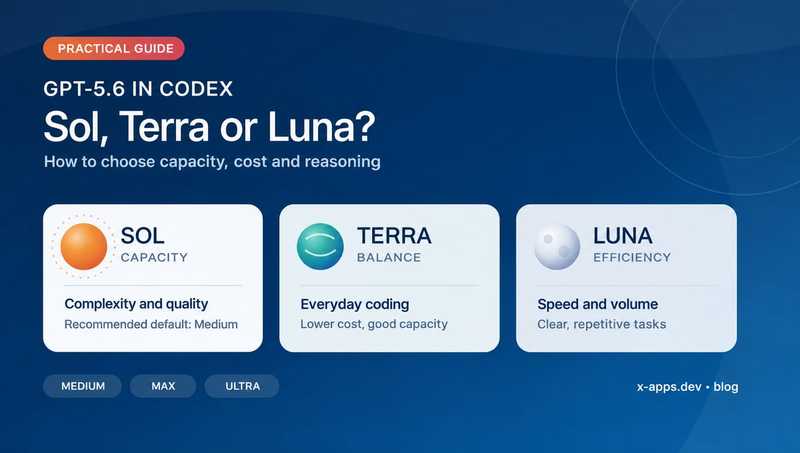
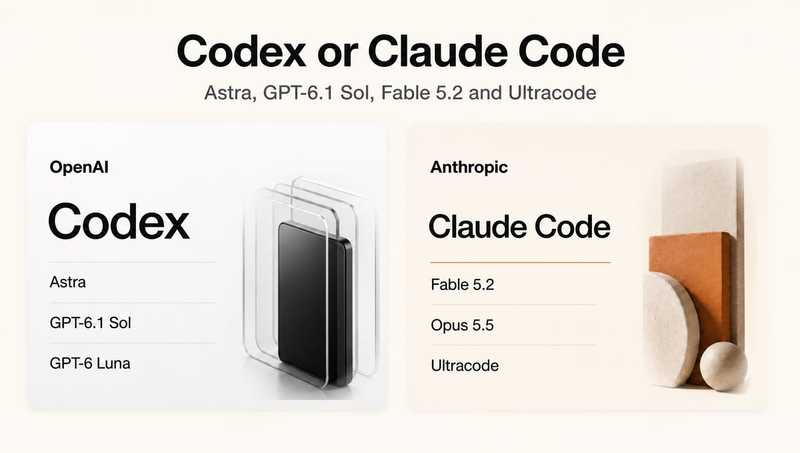
In November 2026, Codex separates model and reasoning effort; above the usual efforts sit Max and Ultra, for larger tasks. The lineup OpenAI recommends for Codex and Work is this:
- GPT-6 Luna: the most efficient model, for focused, high-volume tasks such as summarization, extraction and focused programming.
- GPT-6.1 Terra: fast and efficient, for clear writing, visual understanding and computer use. The documentation lists it in the desktop app, in Work on the web and in the Codex CLI, but not in the IDE extension.
- GPT-6.1 Sol: performance close to Astra at a lower cost, for complex, repeated or long work. With the retirement of GPT-5.5 from Codex on October 14, 2026, OpenAI advises Plus, Pro, Business, Enterprise and Edu users to choose GPT-6.1 Sol when it is available.
- Astra: the most capable, for the most demanding code, app and research flows.
The GPT-5.6 Sol, Terra and Luna models, which this guide cited in July, are the previous generation: they still appear in the credits table but have left the recommended list. OpenAI itself warns that effort levels are not equivalent across generations, so don't copy the old configuration to the new model. (Codex models)
The efforts are Light (in the app and IDE; Low in the CLI), Medium, High, Extra High and, at the two highest levels, Max and Ultra. Light is for quick, well-defined tasks; High and Extra High, for hard work with several steps, sources or exchanges. Max gives more reasoning time to a single task, and Ultra splits a complex task among subagents in parallel. The documentation sums it up: most tasks need neither Max nor Ultra. GPT-6 Luna goes up to Max but has no Ultra.
The weight of each model on the allowance is very different. In OpenAI's estimates for Plus, measured in local messages per five-hour window, Astra yields 5 to 45, GPT-6.1 Sol 15 to 160, GPT-6.1 Terra 35 to 285 and GPT-6 Luna 350 to 3,000. OpenAI notes that these ranges are not fixed limits and that cloud tasks may consume more. (Codex pricing)
| Type of task | Starting configuration |
|---|---|
| Renaming, extraction or mechanical change | GPT-6 Luna, starting at High, as OpenAI recommends |
| Everyday implementation with clear requirements | GPT-6.1 Sol at your Codex client's default effort |
| Text, screen reading or computer use | GPT-6.1 Terra + Medium |
| Debugging, architecture or an important change | GPT-6.1 Sol + High or Extra High |
| A single, deep and very hard problem | GPT-6.1 Sol + Max; Astra only if Sol doesn't solve it |
| Large project with independent fronts | GPT-6.1 Sol + Ultra |
For context on the previous generation, the guide GPT-5.6 Sol, Terra or Luna in Codex remains online as a record from July 2026.
To iterate fast, use a light model without skipping validation
A light model, such as GPT-6 Luna, works well for:
- small fixes;
- localized changes;
- creating a function or test;
- component adjustments;
- renames and conversions;
- quick interface experiments;
- initial investigation of a file.
It is less suited to extensive migrations, architectural decisions, changes across many services or tasks that require long investigation.
Short prompt for a small change in Codex
Make the smallest change needed to reach the objective.

Do not change public interfaces, dependencies or architecture without
proven need.

After implementing:

1. Run the tests related to the modified files.
2. Run lint and type checking, when available.
3. Report the commands you ran.
4. Report which checks passed or failed.
5. Do not consider the task done while there is any error related
   to the change.
While it existed, Spark had a separate quota during the preview. Today fast iteration comes out of the same allowance as the rest of the work, so the gain comes from using an efficient model and a well-scoped request, not from a separate balance. The goal is to reduce latency without reducing rigor.
Save full Codex for real execution
Codex delivers the most value when it has the authority and context to:
- modify several related files;
- investigate an error in the repository;
- run commands and tests;
- implement a feature end to end;
- prepare a migration;
- review changes and risks;
- validate the result in a real environment;
- prepare a commit, push or pull request when asked.
In this kind of task, a theoretical answer in Chat does not replace implementation. Economical use does not mean avoiding Codex; it means arriving at Codex with the task ready to be executed.
Use custom instructions as a preparation standard
ChatGPT custom instructions can define how your ideas should be organized before they become technical work.
For example, you can ask that every software request be converted into problem, assumptions, risks, acceptance criteria and tests. Free and Go users can save up to 1,500 characters; Plus, Pro, Enterprise, Business and Education, up to 5,000. (ChatGPT custom instructions)
Don't mix three different levels of guidance:
| Mechanism | Correct scope |
|---|---|
| Custom instructions | General user preferences in future conversations |
AGENTS.md | Persistent rules for a project or repository |
| Skill | Specialized, repeatable procedure |
Details of a single project should not go into global instructions. They belong in the repository or in a specific skill.
Stop repeating rules: use AGENTS.md
If you explain the same commands, conventions and prohibitions on every task, you are spending context to rebuild something that should be permanent.
Codex reads AGENTS.md files before working. You can keep global guidance in ~/.codex/AGENTS.md and specific rules inside the repository or subdirectories. Instructions closer to the working folder complement or override earlier guidance. (How Codex discovers AGENTS.md)
# Project conventions

## Environment

- Use pnpm.
- Use the Node.js version defined in the project.
- Do not add production dependencies without justification.

## Implementation

- Preserve compatibility with the public API.
- Do not duplicate existing logic.
- Follow the patterns found in adjacent modules.

## Validation

- Run related tests.
- Run lint and type checking.
- Add tests for new behavior.

## Definition of done

- Code implemented.
- Tests passing.
- No related lint or typing errors.
- Changes documented when needed.
The Codex CLI /init command can create an initial structure, but the generated file must be reviewed to represent the team's real process.
Turn recurring procedures into Skills
A Skill combines instructions with references, resources and optional scripts. Codex starts by seeing the name and description and loads the full SKILL.md when the task matches the scope. That is why the description must make clear when to use it and when not to. (How to build Skills in Codex)
Use Skills for tasks such as:
- reviewing migrations;
- publishing a release;
- validating a post;
- preparing a recurring report;
- running visual QA;
- generating a handoff package;
- operating an integration that always follows the same procedure.
Prompt to review a Skill before adopting it
Analyze the skill below as a prompt engineering review.

Check:

1. Whether the name represents its purpose.
2. Whether the description explains when to use it and when not to.
3. Whether there are ambiguous steps or hidden assumptions.
4. Whether the definition of done is verifiable.
5. Whether commands, validations or error handling are missing.
6. Whether the procedure should be split into smaller skills.

Then produce a revised version of SKILL.md and propose
positive, negative and borderline cases to test triggering.
This is one of the biggest long-term gains: each corrected mistake stops being just a conversation and starts improving future runs.
Organize many sources before spending agentic execution
When the work starts with dozens of documents, transcripts, manuals or pages, it is not efficient to ask the agent to reread everything on each attempt.
Gemini Notebook, formerly known as NotebookLM, lets you gather sources and chat with that set. On the free tier, the documentation lists 100 notebooks, up to 50 sources per notebook, 500,000 words per source, 50 daily queries and three audio overviews per day. These limits are subject to change. (Gemini Notebook FAQ)
An efficient flow is:
- Add the sources to the notebook.
- Identify facts, discrepancies, concepts and references.
- Generate a structured summary with citations.
- Check sensitive information against the original sources.
- Take only the relevant context to Chat.
- Trigger Work or Codex to produce the final result.
The notebook organizes knowledge; it does not make every conclusion automatically correct. Citations, numbers and important decisions still require checking.
RAG alternatives without a new subscription
For private knowledge bases or flows under your own control, there are self-hosted and open source options:
- AnythingLLM to chat with documents using local models or external providers;
- Open WebUI as a self-hosted interface with models, tools and knowledge;
- Dify to build knowledge bases, RAG pipelines and reusable applications.
"Without a new subscription" does not mean zero total cost. A local solution may require hardware, storage, power, backup, security and maintenance. Installing the local interface is not enough either: if the model, embeddings or vector database use a cloud provider, data and costs still leave the machine.
To understand the technical decisions behind this layer, see the practical RAG guide and the regression tests for prompts and RAG.
Recommended flow: a base for everyone plus optional accelerators
1. Organize knowledge
Use a notebook or RAG to locate evidence and reduce the material to the relevant context.
2. Plan in Chat
Turn the need into objective, context, constraints, tests and acceptance criteria.
3. Choose the available execution
For small changes and fast cycles, use Codex with GPT-6 Luna. For the rest, choose a model and effort proportional to the task. Without Codex, finish the briefing in Chat and hand it to the environment or team that will do the implementation.
4. Execute in Codex, when included
Modify the repository, run commands and validate real behavior.
5. Produce deliverables in Work or Chat
When Work is enabled, use it for reports, documents, spreadsheets, presentations and completed research. Otherwise, Chat remains suitable for structuring, reviewing and finishing content in formats compatible with the conversation.
6. Preserve what you learned
Move conventions into AGENTS.md and recurring procedures into Skills.
The result is cumulative: each well-executed task lowers the cost of the next ones.
How to avoid charges beyond the subscription
Credits are an optional add-on to keep using compatible features after the included allowance runs out. On eligible plans, Codex Settings → Usage lets you check balance, recent usage and credit options. (Flexible credits in ChatGPT)
If the goal is to spend absolutely nothing beyond the monthly fee:
- check the usage panel periodically;
- keep auto top-up turned off;
- don't buy additional credits;
- lower model and effort when the task allows;
- keep Fast mode and Ultrafast off by default: on the included allowance, Fast consumes 2.5 times the standard rate and Ultrafast 8 times (Codex pricing);
- wait for the limit to renew when the allowance runs out;
- don't confuse an included limit with a promise of unlimited use.
In corporate workspaces, administrators can also set spending controls and limits per user or group. The options vary by plan and configuration.
ChatGPT and Codex usage limits are changing at the end of 2026. For what OpenAI has announced about this, see what changes in the ChatGPT and Codex limit.
Checklist to produce more without paying more
Before starting a request, ask:
- Is it just a question, analysis or planning? Start in Chat.
- Are there many sources? Organize them in a notebook or RAG.
- Is the change small and well-defined? Use GPT-6 Luna in Codex.
- Do files need to be modified and tests run? Use Codex if it is included; otherwise, prepare the handoff in Chat.
- Is the result a complete document or report? Use Work when available or finish in Chat.
- Am I repeating instructions? Record them in
AGENTS.mdor a Skill. - Is the model or effort bigger than the task requires? Lower it safely.
- Does the task have an objective, context, constraints and a definition of done? Complete it before executing.
- Is auto top-up on? Turn it off if you don't accept additional cost.
- Was the result validated? Savings without verification usually turn into rework.
What not to do
- Don't use Codex just to ask "which approach should I choose?".
- Don't trigger Ultra for a short task or one that cannot be parallelized.
- Don't start with Astra out of habit: it burns through the allowance much faster than GPT-6.1 Sol.
- Don't repeat dozens of project rules in every prompt.
- Don't leave
gpt-5.3-codex-sparkin saved configurations, agents or scripts: the model was retired in September 2026. - Don't treat a fast model as a substitute for tests.
- Don't send all raw sources when a verifiable summary does the job.
- Don't assume "local" means private if any component calls the cloud.
- Don't turn on auto top-up without consciously setting a spending cap.
Conclusion
Productivity does not grow because the biggest model was selected for every task. It grows when each surface receives the work it was designed for.
The most accessible core is simple: use ChatGPT to think and prepare, and Gemini Notebook to organize sources. When your account offers the additional surfaces, use Codex to implement and validate, Work for complete deliverables and GPT-6 Luna for short programming cycles. Turn recurring knowledge into AGENTS.md and Skills only when the technical work justifies that layer.
The best way to get value from a subscription is not to burn through the allowance quickly. It is to make each interaction produce a verifiable result and each lesson permanently improve the process.
Want to turn AI experiments into a reliable process?
X-Apps helps companies design AI flows, integrate knowledge, automate tasks and put agents into production with security, governance and observability.
Official sources and documentation
- ChatGPT Work and Codex - OpenAI Help Center
- Using Codex with your ChatGPT plan - OpenAI Help Center
- Using Credits for Flexible Usage in ChatGPT - OpenAI Help Center
- Models - ChatGPT Work and Codex
- Pricing - ChatGPT Work and Codex
- Speed - ChatGPT Work and Codex
- Best practices - Codex
- Custom instructions with AGENTS.md - Codex
- Build Skills - Codex
- Introducing GPT-5.3-Codex-Spark - OpenAI (historical record; the model was retired on September 14, 2026)
- Gemini Notebook FAQ - Google
- AnythingLLM Documentation
- Open WebUI Documentation
- Dify Documentation