Índice do artigofaltam 14 min de leitura
Update of November 10, 2026: this guide was written for the GPT-5.6 generation, released in July. Today the Codex documentation recommends a different list for ChatGPT Work and Codex: Astra, GPT-6.1 Sol, GPT-6.1 Terra and GPT-6 Luna. GPT-5.6 has not been retired (the Codex credit table and the API price table still charge for it), but it is the previous generation and has left the recommended list. For current generation prices, see the GPT-6 Sol and Opus 5.5 price cut; for the credit math, the Codex credits guide.
Straight recommendation today: start with GPT-6.1 Sol at your client's default effort. Change model or effort only when the shape of the task justifies it. In July, the equivalent recommendation was GPT-5.6 Sol + Medium.
The Codex selector separates two decisions that many people still mix up: which model to use and how much reasoning effort to allow. On top of that, Ultra mode adds a third dimension, because it distributes the work among subagents in parallel.
This means that choosing "the strongest" in every field is not necessarily the best strategy. A mechanical change does not need the same investment as a critical migration. And a very hard but strictly sequential problem may benefit more from Max than from several agents in Ultra.
In July, the official documentation recommended starting with GPT-5.6 Sol when in doubt and using Medium as a balanced starting point. In November 2026, the Codex models page organizes the choice by type of work: Astra for the most demanding workflows, GPT-6.1 Sol for performance close to Astra at a lower cost, GPT-6.1 Terra for writing, visual understanding and computer use, and Luna for focused, repeatable tasks. For effort, it says to start 6.1 Sol at the client default, Luna at High and Astra at Light. (ChatGPT Work and Codex models)
Quick summary: which setup to choose?
| Situation | Starting choice today (Nov 2026) | Choice in July (GPT-5.6) |
|---|---|---|
| Simple, repetitive and very well-defined task | GPT-6 Luna + High | Luna + Low |
| Everyday programming on a budget | GPT-6.1 Terra + Medium | Terra + Medium |
| Writing, reading screens, images and computer use | GPT-6.1 Terra + Medium | No dedicated row in July |
| Complex, ambiguous or important work | GPT-6.1 Sol + default effort | Sol + Medium |
| The most demanding work, needing the most judgment | Astra + Light, going up if needed | Astra did not exist in July |
| An extremely hard, sequential problem | Sol or Astra + Max | Sol + Max |
| Large project that splits into several workstreams | GPT-6.1 Sol + Ultra | Sol + Ultra |
This table is a starting point, not an absolute rule. The best model is the smallest one that consistently delivers the required quality. The best setup is the one that lowers the total cost of the task, including review time, rework and risk of error.
One caution when comparing the two columns: OpenAI warns that effort levels do not map exactly across model generations: GPT-5.6's Medium may not deliver the same results as GPT-6.1 Sol's Medium. (ChatGPT Work and Codex models)
First: model, effort and mode are not the same thing
Before comparing models, separate the three layers of the selector:
- Model: today Astra, GPT-6.1 Sol, GPT-6.1 Terra or GPT-6 Luna; in July, GPT-5.6 Sol, Terra or Luna. It defines capability, speed and base price.
- Reasoning effort: Light in the app and IDE extension (Low in the CLI), Medium, High and Extra High, plus Max. It defines how much the model can explore, check and revise before answering.
- Execution mode: Ultra. It uses subagents to handle separate parts of a complex task in parallel.
On the API, GPT-6.1 Sol and GPT-6 Astra accept the efforts low, medium, high, xhigh and max, without none; GPT-6.1 Terra and GPT-6 Luna also accept none. In the GPT-5.6 family, the supported efforts were none, low, medium, high, xhigh and max. The Codex interface translates or shows some of these options depending on version, plan and workspace. Ultra is not another name for max and it is not a model either. (API models, GPT-6 guide)
Sol, Terra, Luna and, now, Astra
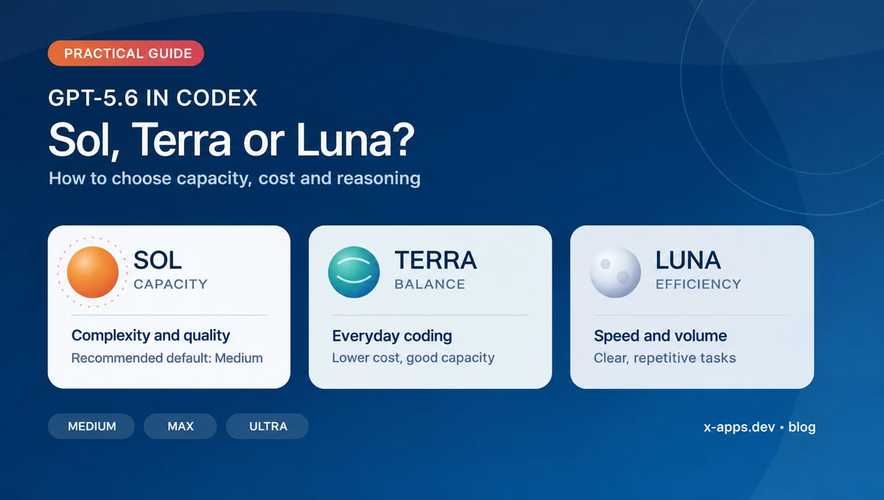
Sol: when quality is the main criterion
In July, GPT-5.6 Sol was the flagship of the GPT-5.6 family, recommended for complex reasoning, programming and professional work, with the alias gpt-5.6 pointing to gpt-5.6-sol. (GPT-5.6 Sol)
Today the equivalent role belongs to GPT-6.1 Sol (gpt-6.1-sol), which OpenAI describes as performance close to Astra for complex work, at a lower cost, and recommends for repeated and long work in code, apps and documents. In Codex and ChatGPT Work, it uses a default context window of 500,000 tokens. It is the model the documentation says to choose first on the Plus, Pro, Business, Enterprise and Edu plans, and it is the example value in config.toml. (ChatGPT Work and Codex models)
Use Sol for:
- architecture and technical decisions with several constraints;
- hard or barely reproducible bugs;
- changes that cut across many files or services;
- deep research and document analysis;
- review of critical changes;
- front end that requires good visual hierarchy and polish;
- ambiguous tasks in which correctly interpreting intent is part of the job.
Sol does not remove the need for context, tests and human review. To organize the rest of the process, also use the AI-assisted development checklist.
Astra: the capability ceiling of the current generation
GPT-6 Astra did not exist when this guide came out. Today it sits at the top: OpenAI presents it as the most capable model for complex work in code, apps and research, with advanced reasoning, computer use and stronger judgment. On the API, it is the one OpenAI says to start with when you are unsure. (ChatGPT Work and Codex models, API models)
The price follows. On the API, Astra costs five times as much as GPT-6.1 Sol per input and output token. In the Plus plan estimates, 5 to 45 local Astra messages fit in a 5-hour window, against 15 to 160 for GPT-6.1 Sol. The documentation says to start Astra at Light. In our reading, that makes sense: high effort multiplies a consumption that is already the largest in the table. (Codex pricing)
Save Astra for the task where GPT-6.1 Sol has already shown its limit: an architecture decision with no obvious answer, a long investigation that demands coherence over many steps, or work where a judgment error is expensive.
Terra: the balanced workhorse
In July, GPT-5.6 Terra balanced intelligence and cost, with performance OpenAI compared to GPT-5.5 and an API price half that of Sol. (GPT-5.6 Terra)
The successor, GPT-6.1 Terra (gpt-6.1-terra), shifted focus a little: OpenAI describes it as a fast, efficient model for clear writing, visual understanding and computer use. It is available in Work and Codex on the Plus, Pro, Business, Enterprise and Edu plans, in the desktop app, in ChatGPT Work on the web and in the Codex CLI. The models page does not list the IDE extension among the places where it appears. If you are migrating from GPT-5.6 Terra, compare the two models on the same tasks and at the same effort before switching. (ChatGPT Work and Codex models, GPT-6 guide)
Terra tends to be a good choice for:
- endpoints and CRUDs with clear requirements;
- automated tests;
- routine code review;
- local refactoring;
- SQL queries;
- technical documentation and text;
- tasks that depend on reading a screen, image or interface;
- maintenance and small features.
If the task already has a well-defined scope, acceptance criteria and project standards, Terra + Medium is still the first alternative for saving money without dropping straight to the simplest model.
Luna: speed, volume and low cost
Luna is the official name of the model. It is not "Lua" (Portuguese for moon). In July, GPT-5.6 Luna was the fastest and most affordable model in the family, optimized for cost-sensitive, high-volume workloads. (GPT-5.6 Luna)
Today the role belongs to GPT-6 Luna (gpt-6-luna), described as the most efficient model for focused, high-volume tasks such as summarization, extraction and focused programming. It is also the model for the Free and Go plans in Codex. An important change: the documentation says to start Luna at High, not at the lowest effort. It supports effort up to Max, but not Ultra. (ChatGPT Work and Codex models)
Use Luna when the task is well specified and a correct answer is easy to recognize:
- transforming or normalizing data;
- extracting fields from structured content;
- classifying text;
- generating boilerplate;
- renaming symbols with an explicit rule;
- making mechanical edits;
- summarizing organized material;
- running many small, independent tasks.
Luna should not be the default for architecture, ambiguous investigation or changes with a high cost of error. The speed gain can disappear if review and rework grow.
How much does each model cost on the API?
Official API prices on November 10, 2026, per 1 million tokens, with Standard processing and requests of up to 272,000 tokens:
| Model | Input | Cached input | Output | Relative to GPT-6.1 Sol |
|---|---|---|---|---|
| GPT-6 Astra | US$ 10.00 | US$ 1.00 | US$ 50.00 | 5 times (cache at 10 times) |
| GPT-6.1 Sol | US$ 2.00 | US$ 0.10 | US$ 10.00 | Reference |
| GPT-6.1 Terra | US$ 1.00 | US$ 0.05 | US$ 5.00 | 50% of the price |
| GPT-6 Luna | US$ 0.10 | US$ 0.01 | US$ 0.50 | 5% of the price (cache at 10%) |
| GPT-5.6 Sol (previous generation, promotional) | US$ 4.00 | US$ 0.40 | US$ 20.00 | Double the price (cache at 4 times) |
| GPT-5.6 Terra (previous generation) | US$ 2.00 | US$ 0.20 | US$ 12.00 | Same on input, more expensive on cache and output |
| GPT-5.6 Luna (previous generation) | US$ 0.20 | US$ 0.02 | US$ 1.20 | 10% of the price (cache at 20%, output at 12%) |
OpenAI states that the GPT-5.6 Sol promotional price is valid until November 30, 2026. Requests above 272,000 tokens have a higher rate. (API pricing)
The practical conclusion has changed since July: staying on GPT-5.6 today costs more per token than migrating. GPT-6.1 Sol costs half of promotional GPT-5.6 Sol on input and output (and a quarter on cache). GPT-6 Luna costs half of GPT-5.6 Luna on input and less than half on output (US$ 0.50 against US$ 1.20).
These are API prices, not a direct conversion of the Codex allowance. Inside Codex with a ChatGPT login, paid usage beyond the allowance is charged in credits, and OpenAI itself warns that the credit price alone does not determine how much fits in the subscription. In the credits per million output tokens table, GPT-6.1 Sol costs 250, GPT-6.1 Terra 125, GPT-6 Luna 12.5 and GPT-6 Astra 1,250; GPT-5.6 Sol still appears, at 500. (Codex pricing)
For historical reference, the API prices on July 20, 2026 were:
| Model | Input | Cached input | Output |
|---|---|---|---|
| GPT-5.6 Sol | US$ 5.00 | US$ 0.50 | US$ 30.00 |
| GPT-5.6 Terra | US$ 2.50 | US$ 0.25 | US$ 15.00 |
| GPT-5.6 Luna | US$ 1.00 | US$ 0.10 | US$ 6.00 |
On July 30, OpenAI cut Terra by 20% and Luna by 80%, and Sol later moved to the promotional price in the table above. The detailed math for credits, Ultra and Fast mode is in the Codex credits guide.
Light, Medium, High, Extra High or Max?
The reasoning level is a setting separate from the model. The right recommendation is not to always select the highest value, but to use the lowest effort that delivers the required result.
Light (Low in the CLI)
Prioritizes fast answers and lower consumption. OpenAI recommends it for quick, well-scoped tasks. It is also the starting point the documentation recommends for Astra. (ChatGPT Work and Codex models)
Examples:
- changing a piece of text;
- converting a format;
- finding references;
- creating a repetitive structure;
- applying an already defined mechanical rule.
In July, this guide recommended Luna + Low for volume work. With GPT-6 Luna, the official guidance is to start at High and only go down if the task proves it can handle it.
Medium
The balance between speed and depth. In July, OpenAI's documentation recommended medium as a balanced starting point on the API, and GPT-5.6 used Medium as the default when effort was omitted. For GPT-6.1 Sol in Codex, the current guidance is to start at the effort your client ships with by default and adjust per task. (ChatGPT Work and Codex models)
Use Medium for ordinary implementation, debugging, analysis, planning and review when there is no evidence that more effort will improve the result.
High and Extra High
OpenAI recommends High and Extra High for hard work, with several steps, sources or trade-offs to weigh. Step up gradually from Medium before jumping to Max.
Use them for:
- debugging with multiple hypotheses;
- architecture review;
- broad changes with moderate risk;
- technical analysis that needs to compare alternatives.
Max
At the GPT-5.6 launch, OpenAI described Max as more time than xhigh to reason, explore alternatives, run checks and revise the approach, reserved for the hardest workloads. (GPT-5.6 launch) The current Codex documentation keeps the idea: Max gives the chosen model more time to reason about a single task, for the hardest problems, when depth matters more than speed or consumption. (ChatGPT Work and Codex models)
Use Max for a single deep problem:
- diagnosing a deadlock;
- finding a race condition;
- validating a critical migration;
- proving or reviewing the correctness of an algorithm;
- investigating a rare bug;
- analyzing an architecture with many constraints.
Max takes longer and consumes more. If GPT-6.1 Sol at default effort already produces a complete, verifiable and correct solution, raising the effort tends to bring diminishing returns.
Max versus Ultra: what is the difference?
Max deepens one agent. Ultra organizes several agents.
At the GPT-5.6 launch, OpenAI described Ultra as its highest capability setting, coordinating four agents in parallel by default, with more tokens in exchange for stronger results and less wall-clock time. (GPT-5.6, OpenAI) In the current documentation, Ultra uses subagents to handle separate parts of a complex task in parallel, and the recommendation is to choose it when the work can be split into parts that make sense. The same page warns that most tasks need neither Max nor Ultra. GPT-6 Luna goes up to Max, but has no Ultra. (ChatGPT Work and Codex models)
Use Max when the work is deep and sequential
- an investigation depends on the conclusion of the previous step;
- there is a single central problem;
- several attempts need to share the same reasoning;
- parallelizing would add coordination without shortening the critical path.
Use Ultra when there are independent workstreams
- auditing security, performance, tests and architecture separately;
- migrating several modules or services;
- analyzing a large repository by area;
- researching alternatives in parallel and then consolidating;
- building back end, front end, tests and documentation as coordinated deliveries.
To fix a function or change one file, Ultra is usually waste. For a large project, it can reduce total time if the workstreams really are independent. To go deeper into the structure around these flows, see the guide on agent orchestration with governance.
Ultra should not be confused with Ultrafast, which is a speed mode, not a parallelism mode. Ultrafast exists only for GPT-6 Astra and GPT-6.1 Sol, on the US$ 500 Pro plans and on eligible Enterprise and Edu plans, and it consumes the subscription allowance at 8 times the standard rate. Regular Fast mode consumes at 2.5 times. (Speed in Codex)
The policy I would adopt day to day
GPT-6.1 Sol at default effort as the starting point
Use it for new tasks, debugging, architecture, planning, business analysis and relevant changes. It is the choice least likely to make you save on the model and pay later in review or rework.
GPT-6.1 Terra + Medium for defined work
Switch when requirements are clear and the work is routine: CRUDs, tests, endpoints, common refactoring, documentation, text and tasks that depend on reading a screen or image.
GPT-6 Luna + High for volume
Use it for renames, conversions, classification, extraction, repetitive generation and simple edits. Keep objective criteria to check the answer.
Astra or Max after evidence of difficulty
Step up when GPT-6.1 Sol produces a shallow or inconsistent solution or cannot close the problem. Astra brings a more capable model; Max gives the same model more time. Do not use either just because the delivery is important; importance calls for validation, not necessarily maximum reasoning.
Ultra for parallelizable projects
Use it when there is enough work for several agents and clear boundaries between workstreams. Without decomposition, acceptance criteria and consolidation, parallelism just becomes distributed cost.
Practical examples of choice
| Request | Suggested setup (Nov 2026) | Why |
|---|---|---|
| Rename fields following a ready-made map | GPT-6 Luna + High | Mechanical and verifiable |
| Write tests for an already documented service | GPT-6.1 Terra + Medium | Clear scope with moderate reasoning |
| Implement a feature across several layers | GPT-6.1 Sol + default effort | Requires context and integration |
| Investigate rare data corruption | GPT-6.1 Sol + Max, or Astra | Deep, sequential problem |
| Audit a monorepo for security, tests and architecture | GPT-6.1 Sol + Ultra | Independent workstreams that can be consolidated |
| Refine an important interface | GPT-6.1 Sol + Medium or High | Visual and functional quality matter |
| Summarize hundreds of structured records | GPT-6 Luna + High | Volume and a predictable pattern |
The selector does not replace process. Even with Astra, Max or Ultra, a task without scope, tests and acceptance criteria can speed off in the wrong direction. That is the same risk discussed in the article on AI projects without architecture.
Why might the model you are looking for not show up in your Codex?
The GPT-5.6 rollout started on July 9, 2026. At that time, in Codex, Free and Go users had access to Terra; Plus, Pro, Business and Enterprise users could choose Sol, Terra and Luna; Max was available for accounts with GPT-5.6, and Ultra for Plus plans or higher. The minimum versions were desktop app 26.707.30751 and Codex CLI 0.144.0. (GPT-5.6 in ChatGPT and Codex)
In November 2026, the picture is different. For people who sign in to Codex with a ChatGPT account:
- on the Plus, Pro, Business, Enterprise and Edu plans, OpenAI says to choose GPT-6.1 Sol (
gpt-6.1-sol) when available; - on the Free and Go plans, the recommended model is GPT-6 Luna (
gpt-6-luna), in the desktop app, subject to gradual rollout; - GPT-6.1 Terra is in Work and Codex on Plus plans and up, but the models page does not list it in the IDE extension;
- GPT-5.6 appears neither on the recommended list nor on the retired list; the credit table still charges for it;
- GPT-5.5 was retired from Codex with a ChatGPT login on October 14, 2026, gpt-5.4 and gpt-5.4-mini on August 31, and GPT-5.3-Codex-Spark on September 14, when it left the desktop app, the Codex CLI and the IDE extension. Saved settings, agents and scripts pointing to these models need to be updated.
(ChatGPT Work and Codex models, Codex pricing)
People who use Codex with an API key follow a different rule: model availability follows the API models enabled for the key, and usage is charged by the API price table. OpenAI says the GPT-5.5 retirement does not apply to sessions authenticated with an API key, and the retirement of gpt-5.4 and gpt-5.4-mini was announced only for people who sign in with a ChatGPT account. Spark, on the other hand, left the desktop app, the CLI and the IDE extension without that caveat.
If the options do not show up, check:
- desktop app and Codex CLI are up to date;
- the model saved in
config.toml, which the desktop app, the CLI and the IDE extension share; - eligible plan;
- correct workspace;
- model enabled by the organization's administrator.
What about the guide comparing Codex and Claude Code?
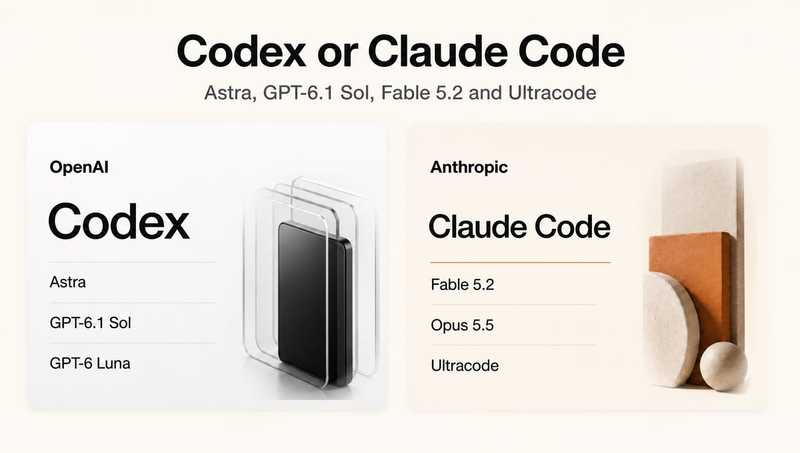
The guide Codex or Claude Code: which model and execution mode for each task compares the current Codex models with the Claude Code models and shows what replaced each retired model. This article has another goal: to work as a short operating policy for choosing among Codex models and deciding between default effort, Max and Ultra.
Rule of thumb
- Start with GPT-6.1 Sol at default effort.
- Switch to GPT-6.1 Terra + Medium when the task is routine and well defined.
- Switch to GPT-6 Luna + High when the work is repetitive and verifiable.
- Step up gradually to High or Extra High when the task calls for it.
- Use Astra or Max when a single problem is truly hard.
- Use Ultra when there are several independent workstreams.
Checklist before changing the setup
- Is the task clearly defined?
- Is the cost of a mistake low, medium or high?
- Can the correct answer be checked objectively?
- Is the problem deep and sequential, or broad and parallelizable?
- Has GPT-6.1 Sol at default effort already been tried?
- Will a smaller model reduce cost without increasing rework?
- Will Astra or Max bring more depth, or just more delay and consumption?
- Does Ultra have independent workstreams, owners and consolidation criteria?
- Do old settings point to GPT-5.6 or to a retired model?
- Are tests, review and approval still planned?
Conclusion
In July, the safest setup to start with in Codex was GPT-5.6 Sol + Medium. In November 2026, it is GPT-6.1 Sol at the client's default effort, which costs half as much on the API as GPT-5.6 Sol costs today.
The principle has not changed: the real gain comes from switching with intent. Terra for everyday work, writing and screens, Luna for predictable volume, Astra and Max for depth and Ultra for parallelism. Always selecting the biggest model and the highest effort is not maturity. Maturity is using the capability you need, measuring quality and keeping validation proportional to risk.
Official references
- Recommended models for ChatGPT Work and Codex, OpenAI (read on November 10, 2026)
- Codex pricing, plans and credits, OpenAI (read on November 10, 2026)
- Speed: Fast mode and Ultrafast in Codex, OpenAI (read on November 10, 2026)
- API pricing, OpenAI Developers (read on November 10, 2026)
- API models, OpenAI Developers (read on November 10, 2026)
- GPT-6 usage and migration guide, OpenAI Developers (read on November 10, 2026)
- GPT-5.6: launch, availability, Max, Ultra and pricing, OpenAI (July 2026)
- GPT-5.6 in ChatGPT and Codex, OpenAI Help Center (July 2026)