Índice do artigofaltam 9 min de leitura
Wednesday, October 21, 2026, 11 a.m. Brasília time. The PHP project has just published the fix for two critical flaws known as PHP2Shell, and every team running a PHP system is asking the same question: is ours exposed? In the operation of the UNICEF portal, which X-Apps maintains on Drupal, the answer came the same day, and the check used an external scan with Pentest-Tools.com. This article explains what this tool is, what it did that day, how much it costs and where it fits, or doesn't, in a company's operations.
What happened at UNICEF on October 21
X-Apps is UNICEF's technical partner for the ongoing delivery of Drupal services, which runs on PHP. The operation has separate development, staging (the test environment that mirrors production) and production environments, traceable releases, monitoring and reports. The setup is described in the UNICEF case study, and the account below is published with the client's permission, without details of versions or configurations.
After the critical alert, the team started an unscheduled check, supported by Pentest-Tools.com's external scanner, which flagged a sign of exposure. From there, the operation followed its already documented routine. It checked the components the system depends on and confirmed that the environment needed the fix, prepared the update and tested the main flows in staging: admin access, content publishing and integrations. With the rollback plan ready, it applied the update to production the same day. Then came the checks that separate "I updated" from "it's fixed": the version actually running in the services, functional checks in the real environment and the logs for the following hours. The client received a report with what was checked, the fix applied, the tests and the recommendations.
The scanner's role in this story is small and useful: it helped turn "we heard about the alert" into "there are signs it affects us", and the operations team confirmed and fixed it over the rest of the day. The companion piece to this article, on the PHP flaw and what to update, covers the flaw itself and what to ask of your hosting provider; here the subject is the tool.
What Pentest-Tools.com is, in one paragraph
It is a cloud platform for vulnerability scanning and penetration testing, made by the company of the same name, founded in 2017 and based in Bucharest, Romania. You point the tool at a website, a network address or an API (the door through which one application talks to another system), and it looks for known flaws, on higher plans tries to prove they are exploitable, and generates a report with what to fix. On Gartner Peer Insights, Gartner's user review platform, it had a rating of 4.6 from 37 reviews on October 22, 2026, in the adversarial exposure validation category. The tool came to X-Apps on the recommendation of Gartner analysts, when X-Apps consulted them. The company claims more than 2,100 security teams as customers in more than 119 countries; those are its numbers, not our measurement.
A common misreading to clear up right away: "pentest" here is not the expensive service of an ethical hacker hired once a year. It is a scanner that runs in minutes, as many times as you want, with a free edition. Human pentesting exists at the same company, as a separate service.
What it does, in four steps
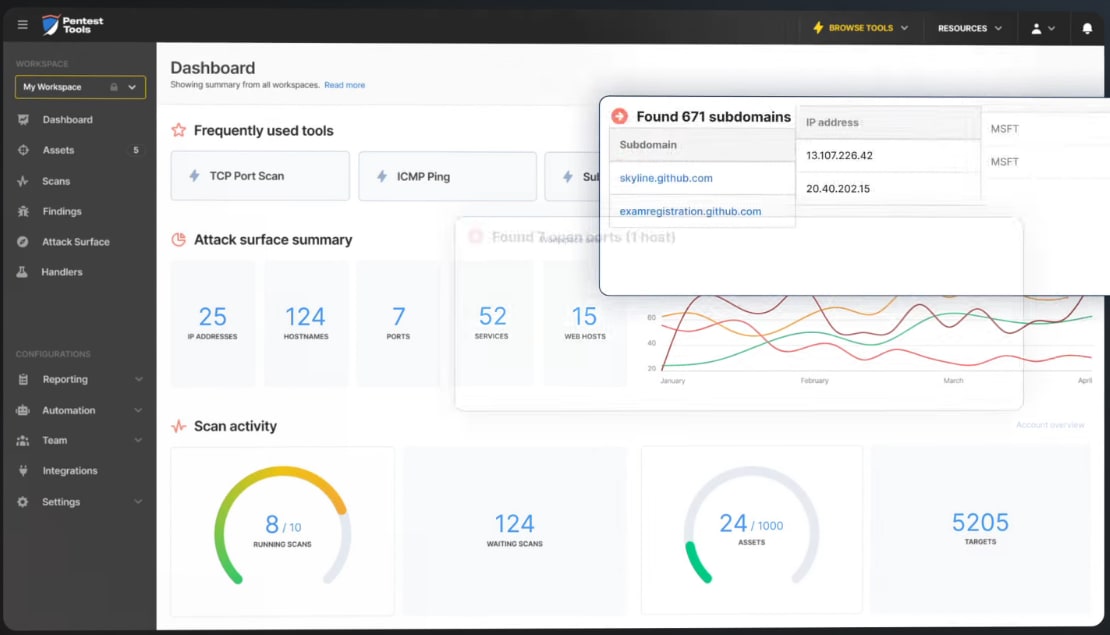
The dashboard summarizes what the tool sees from the outside: how many addresses, hostnames, ports and services your company exposes on the internet, and what the scans found. It is the first answer to the question "what of ours is visible out there?", which many companies have never asked.
The flow has four phases, and each one answers a business question.
- Reconnaissance: what does my company expose? The tool discovers subdomains (the secondary addresses of your domain, like store.company.com), open ports (the server's network entry points), hidden pages and technologies in use. It is common for an old system that nobody remembered was still live to show up.
- Scanning: which of these have known flaws? The website, network and API scanners, and the specific ones for WordPress and Drupal, compare what they found with a database of published flaws, like the two in PHP2Shell. The company says its website scanner covers more than 75 types of web vulnerabilities, including the classic SQL injection and XSS, which are command injections through forms and the browser.
- Exploitation: is the flaw real or a false alarm? On the Exploit plan, the tool tries to exploit the flaw in a controlled way and delivers proof. This is what separates a list of suspicions from a confirmed risk.
- Reporting: what to fix first, and how to prove it was fixed? Reports in PDF, Word or spreadsheet, with priority, evidence and remediation steps, and mapping to standards such as ISO 27001 and SOC 2.
All of this can be scheduled, repeated and connected to Slack, Teams, Jira, the delivery pipeline and even an AI agent through MCP, the protocol that connects tools to language models. For operations, what matters is repetition: the scan that runs every week and alerts you when something has changed.
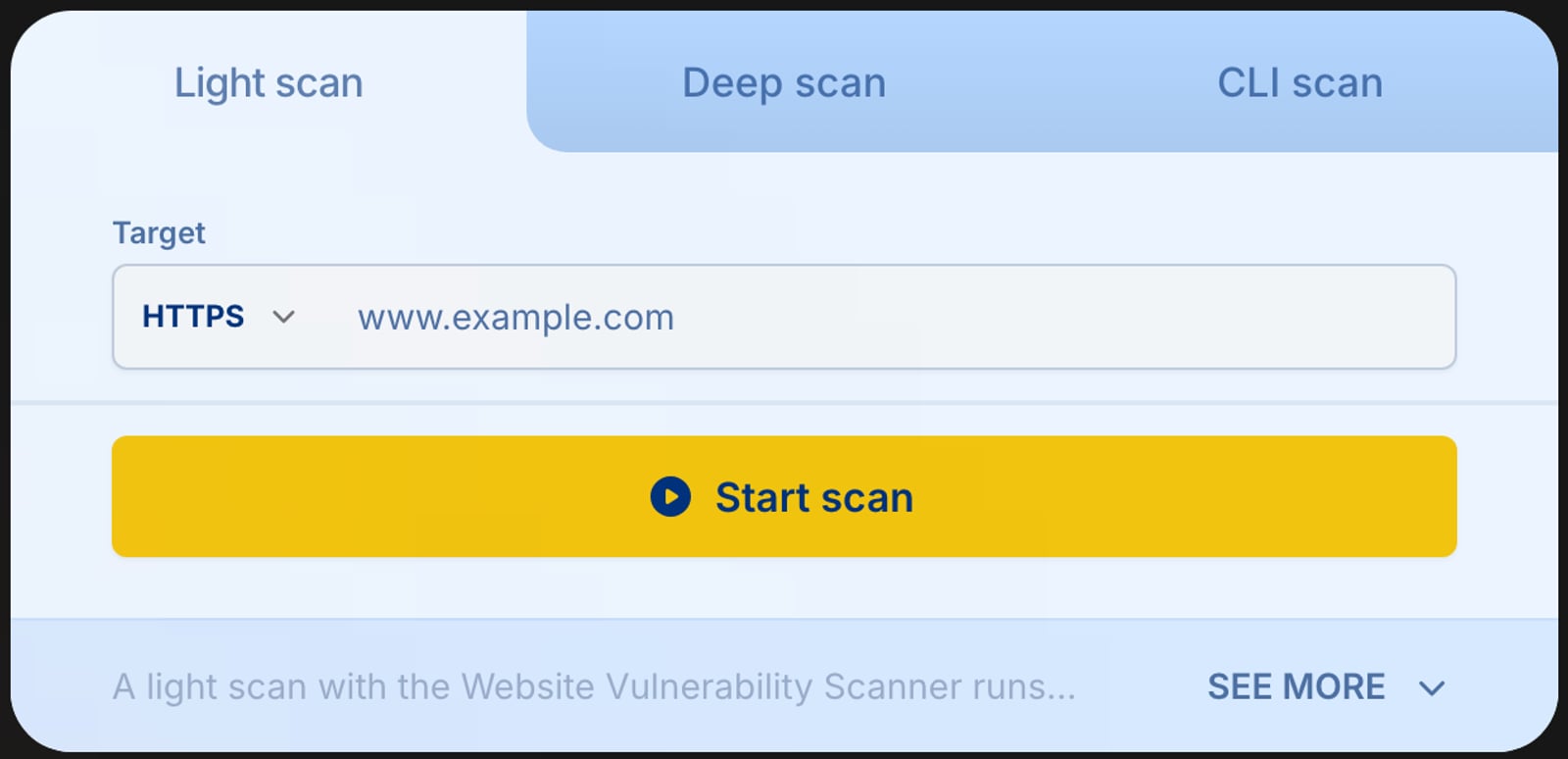
For the decision maker, reconnaissance is the part that surprises most, because it shows systems the company forgot it had; scanning is the part that repeats most.
The free PHP2Shell scanner: minutes to find out
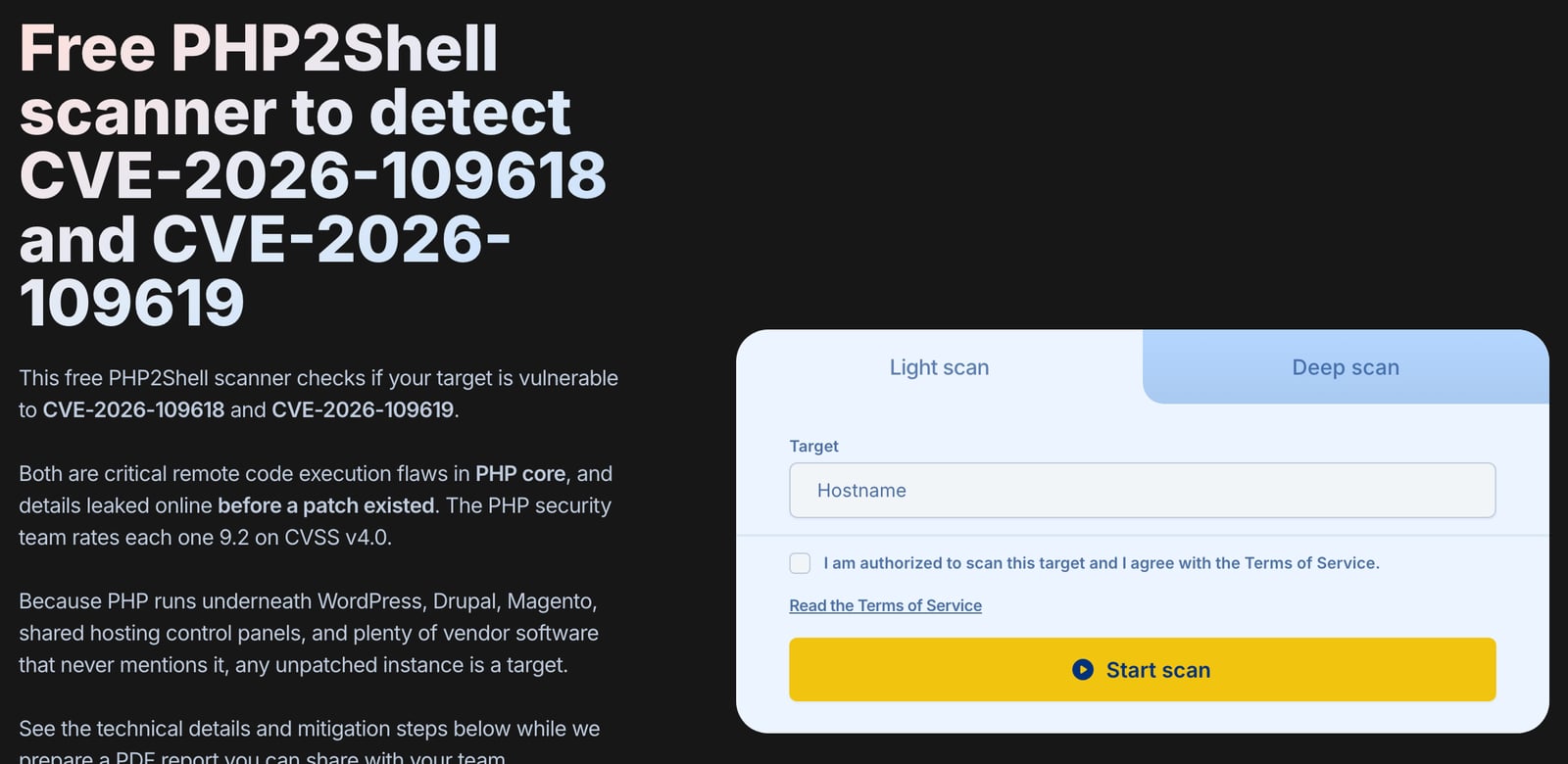
On the same day as the PHP fix, Pentest-Tools.com published a free scanner dedicated to the two flaws, CVE-2026-109618 and CVE-2026-109619. Using it takes three steps: type the site address, tick the box declaring authorization over the target and click start. The result includes the severity score (both flaws are rated 9.2 on a scale that goes up to 10), the remediation steps and a PDF to pass on to the team.
The free version does the light scan, with a limit of two per day (as shown on the page on October 22); the deep scan and the authenticated scan (with login, to see what only logged-in users see) are part of the 7-day trial of the paid plans, which asks for a corporate email and a card.
Two caveats the page itself acknowledges, and that apply to any scanner. The first is authorization: scanning a system that is not yours, without permission, may constitute the crime of unauthorized access to a computer device (Article 154-A of the Brazilian Penal Code) and violates the tool's terms, which is why it requires the statement. The second is the method's limitation: identifying the flaw by the PHP version "is tricky", in the company's words, because many servers hide the version and many Linux distributions apply the fix without changing the number. A "not vulnerable" result is not proof that the server was fixed, and a "vulnerable" result may be a server fixed by the distribution. The scanner answers quickly; the confirmation comes from whoever operates the server, checking the components before and the version actually loaded after the fix, as UNICEF's operations team did.
What it costs, in reais and in dollars
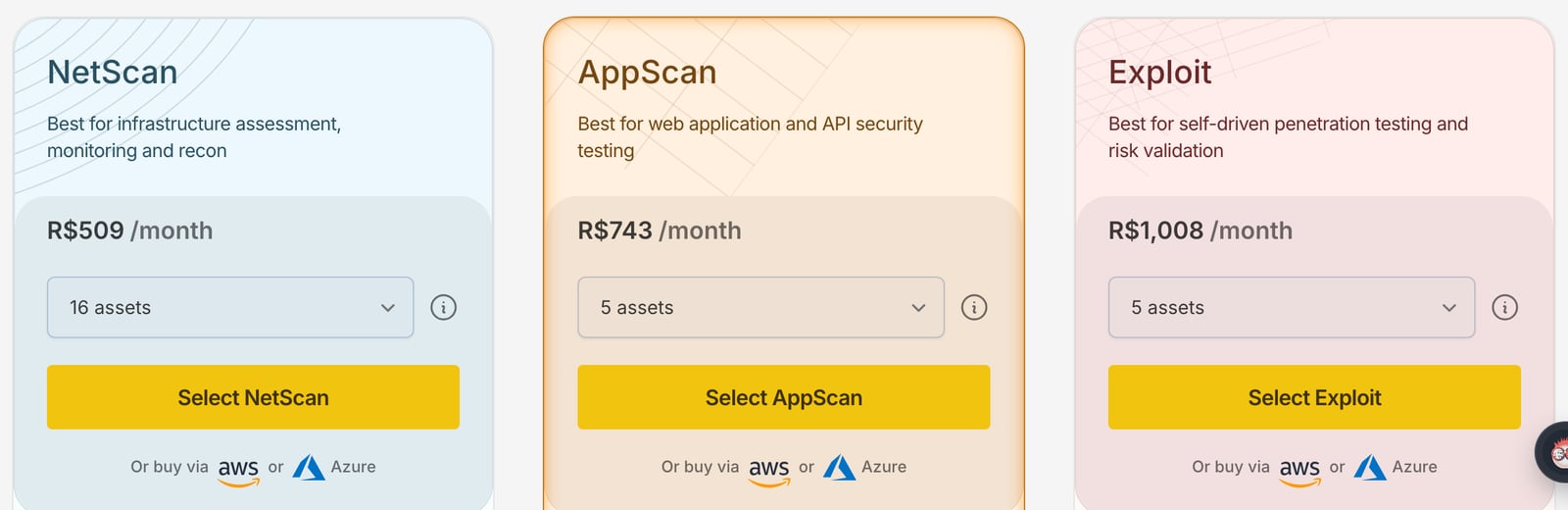
The prices below are those published by the company, dated October 20, 2026, and vary with the number of assets (websites, addresses or hostnames you scan per month) and the billing cycle. The annual plan charges for ten months.
| Plan | Entry price (viewed from Brazil, October 22, 2026) | What it is for | What it adds |
|---|---|---|---|
| Free Edition | free | getting to know the tool and scanning up to 5 assets per cycle | light scans, 2 in parallel, 90 days of history; no authenticated scanning and no API |
| NetScan | R$ 509 per month, 16 assets | network, cloud and reconnaissance | network scanner, cloud (AWS, Azure, GCP), password auditing, limited web scanning |
| AppScan | R$ 743 per month, 5 assets | websites, stores and APIs | everything in NetScan, full and authenticated web scanning, APIs, WordPress and Drupal scanners, false positive classifier |
| Exploit | R$ 1,008 per month, 5 assets | proving the flaw is real | everything in AppScan, automatic exploitation (Sniper, SQLi, XSS) and pentest report generator |
All paid plans have an API, unlimited repeat scans, scheduling, alerts and unlimited team members. Based on the table, a corporate website, a store and an exposed internal system fit in AppScan with 5 assets; dozens of network addresses fit in NetScan. The asset count resets every calendar month. On October 22, the banner on the pricing page said PHP2Shell detection was included in all paid plans, with unlimited rescans to validate the fix.
Where it fits in an operation
In our work, the question "is this site exposed?" comes before any inventory, and the external scanner answers in minutes what the inventory answers in days. It does not replace the inventory, but it changes the order of things. The uses most companies can take advantage of:
- Exposed websites, stores and systems. Scheduled scanning, with an alert when the result changes from one week to the next. It is the use we see most in projects, and the one that depends least on people: the tool compares the new result with the previous one and only alerts when something has changed.
- Triage when an alert comes out. The UNICEF case: the alert comes out, the scan flags the sign, the operations team checks the components, confirms and fixes, and checking the version loaded after the fix closes the loop.
- Before taking over a third party's system. When a client asks X-Apps to take over hosting and maintenance of a site another team built, the scan is the first snapshot of what we are inheriting, before the quote.
- Evidence for audits and for the LGPD. The dated report with findings is what you show the auditor for information security standards such as ISO 27001 or SOC 2. And it is part of what the company needs to have on hand if it ever has to assess an incident: Article 48 of the LGPD (Brazil's data protection law) requires notifying the authority when there is relevant risk.
- Forgotten subdomains and systems. Reconnaissance finds "the system the agency built five years ago" that nobody shut down.
- Weak passwords and misconfigured cloud. Two uses that stay off the radar of anyone who only thinks about the website.
What the scanner does not do
It does not fix anything: it points things out, and the fix belongs to whoever operates the server. It does not see what is not exposed to the internet, unless you install the internal network agent, a program that runs inside the company's network. It makes mistakes: the company claims 92% accuracy in web scanning and a classifier that cuts false positives in half, but those are its numbers, and any scanner returns suspicions that someone needs to confirm or discard. It does not replace penetration testing done by people, which the same company sells as a separate service and which is worthwhile for critical systems, with business rules no scanner understands. And it does not replace the person in charge: a weekly scan that nobody reads is just one more report in the inbox.
Where the scanner makes little difference: a company whose entire site is on a managed platform that updates the server on its own and already has a security team watching. Where it makes a big difference: a company with a website, store or system on its own server or on regular hosting, with nobody tasked with looking at it every week. That is a common profile among the companies that come to us.
The decision after the scan
Running the free scan on your own site today takes minutes and answers the most basic question. The real decision comes afterwards: who will read the result every week, confirm what is real and apply the fix. In an ongoing operation, like UNICEF's, this has a name, a routine and a report; it is what X-Apps does under a DevOps Operation contract, with the external scan as one of the steps, not the only one.
If you ran the scan on your company's site right now, who would receive the report, and what would that person do with it tomorrow morning?
Where each number comes from
| Number | Source | Class |
|---|---|---|
| Founded in 2017, Bucharest, 51 to 200 employees | company profile on Gartner Peer Insights, updated January 29, 2026, and company website | company statement |
| Rating of 4.6 from 37 reviews | Gartner Peer Insights, Adversarial Exposure Validation category, read on October 22, 2026 | primary source (user review platform) |
| More than 2,100 teams in more than 119 countries; 92% accuracy; 50% fewer false positives; more than 75 types of web vulnerabilities | company website, October 22, 2026 | company statement, not verified |
| Prices in reais (R$ 509, R$ 743, R$ 1,008) and in dollars (US$ 96, US$ 140, US$ 190); annual plan for ten months; Free Edition with 5 assets | pricing page, updated October 20, 2026, read on October 22, 2026 from Brazil and from abroad | primary source |
| PHP2Shell scanner, free light scan, 2 per day, 7-day trial | scanner page, updated October 21, 2026, and screenshot from October 22 | primary source |
| CVSS 9.2 for both CVEs (the severity score, on a scale up to 10) | PHP advisory of October 21, 2026 | primary source |
| Article 154-A of the Brazilian Penal Code (unauthorized access to a computer device) | Law 12,737/2012, amended by Law 14,155/2021 | primary source |
| UNICEF intervention on October 21, 2026 | X-Apps operations, reported with the client's permission, without environment details | first-hand experience |
| Gartner's recommendation to X-Apps | X-Apps consultation with Gartner analysts | first-hand experience |
The screenshots are from the public Pentest-Tools.com website on October 22, 2026, and the numbers that appear in them are from the vendor's demo, not from an X-Apps client.
Frequently asked questions
Not for the basic scan. The free version asks for the site address, confirmation that you are authorized to test it and one click. Reading the result and deciding what to do with it is where whoever operates the server comes in.
No. It shows whether the target appears exposed and what to do; the fix is applied by whoever operates the server, as in the PHP2Shell case, where the fix is updating PHP.
There is a free edition with up to 5 assets per cycle. Paid plans, viewed from Brazil on October 22, 2026, start at R$ 509 (Brazilian reais) per month (NetScan, 16 assets), R$ 743 (AppScan, 5 assets) and R$ 1,008 (Exploit, 5 assets), with a discount on the annual plan. Prices vary with the number of assets and may change.
No. The tool requires you to declare authorization over the target. Scanning a third party's system without permission may constitute the crime of unauthorized access to a computer device under Brazilian law (Article 154-A of the Penal Code) and violates the tool's terms. Use it on what is yours, or on what the client has authorized in writing.
The tool came to X-Apps on the recommendation of Gartner analysts, when X-Apps consulted them. Publicly, what exists is the profile on Gartner Peer Insights, a user review platform, with a rating of 4.6 from 37 reviews on October 22, 2026.