Índice do artigofaltam 6 min de leitura
Staging exists so you can make mistakes safely, without "breaking" things for the people who actually use the app.
If you have ever heard things like "push it and I'll test it", "let's test it live" or "the environment doesn't matter", this article is for you.
When an app (and its API) has no separate environments, one of two things almost always happens:
- The team is afraid to update ("what if it breaks for everyone?") and the product stops evolving; or
- The team updates quickly, but with high risk, and the end user pays the price (instability, inconsistent data, an overloaded support team).
Separating Staging (called homologação in Brazil) and Production is one of the simplest practices to reduce risk and speed up the app's evolution in the medium and long term.

What you will find here
- What "Staging" is and what "Production" is (no jargon)
- Simple examples of what goes wrong when everything is mixed
- Which data should and should not go to staging
- How this affects URLs (api., admin., app.) and domain organization
- How this affects app stores and testing (Play Console / TestFlight)
- A practical checklist to organize this in your project
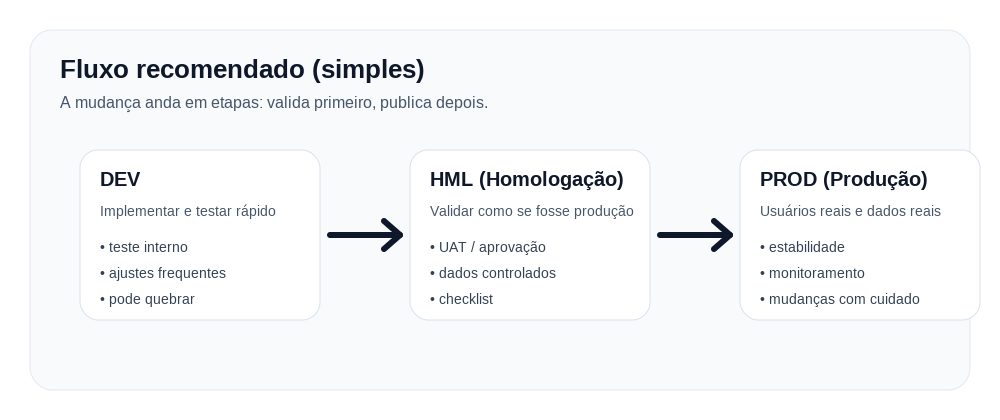
1) What each environment is, without jargon
Think of environments as "different places" where the same system can run, for different purposes.
| Environment | What it is for | Who uses it | Golden rule |
|---|---|---|---|
| Development (DEV) | Build and test fast | technical team | can "break" without major consequences |
| Staging (HML) | Validate as if it were production (UAT), with a process and checklist | team + client | should look like production, but with controlled data |
| Production (PROD) | The real business operation | end users | stability and real data come first |
Staging is, in practice, the "dress rehearsal" before you roll a change out to real users.
2) Why separate Staging and Production
Separating environments looks like "red tape", but in practice it is what prevents rework and crises.
The main gains:
-
You test without messing up real data
Testing sign-ups, orders, payments, rules... all of this creates data. In production, that data becomes "truth" (reports, finance, support). -
You reduce the risk of instability for users
A change to the API or database can break the app for everyone if there is no validation step before it. -
You maintain privacy and compliance
Staging usually does not have the same level of protection and access control as production. That is why real data needs care. -
You gain predictability in deploys
The change follows a path: it is deployed to staging → is validated → is published to production. -
You make support and diagnosis easier
When there is a staging environment, you can reproduce problems safely and test fixes without "touching" what is live.
3) Simple examples of what goes wrong when everything is mixed
This list is based on common problems that stall projects (and create unnecessary arguments).

Example 1: "Just a quick test" makes a mess in finance
The client asks to "test a purchase", the team creates orders, refunds them, creates them again...
Result: wrong reports, confusing reconciliation and arguments like "a payout is missing".
Example 2: The app "notified" the wrong user
You test a push notification, an email or an SMS.
Without separation, the message may go out to real users.
Example 3: A database change breaks the app during business hours
A database migration or a rule change goes straight to production.
The app starts failing for everyone, and the team goes into "firefighting" mode.
Example 4: Metrics become garbage
If you test in production, your analytics mix "real usage" with "tests".
Afterwards, nobody trusts the numbers.
Example 5: Personal data in a fragile environment
Copying production data to "any old" test server is a common source of incidents.
Even if it is "just for testing", it is an exposure risk that a process can prevent.
4) Which data should and should not go to staging
The goal of staging is to behave like production, not necessarily to hold the same data.
The practical rule is:
- Staging needs enough data to validate the flows.
- Production is the only place for real business data.
A practical table for non-technical readers
| Type of data | Can it go to staging? | Simple recommendation |
|---|---|---|
| Real personal data (CPF, the Brazilian taxpayer ID, address, real customer email) | ⚠️ Avoid | Use fictitious or anonymized data. If you need "realism", use masking/anonymization with a defined process. |
| Sensitive financial data (cards, bank details) | ❌ No | Use the providers' sandbox environments (payments, anti-fraud, etc.). |
| Real orders/contracts | ❌ No | Use "test data sets" (fictitious orders). |
| Test users (internal accounts) | ✅ Yes | Create dedicated profiles for testing and UAT. |
| Catalog/settings (products, categories, tables) | ✅ Yes | You can copy from production carefully, as long as no personal data is exposed. |
| Service keys (Pix, Brazil's instant payment system, email, push, maps) | ✅ (if they are test keys) | Keep separate keys: sandbox/test for staging and production for production. |
A simple way to organize staging data
If you want a quick model (that works):
- Standard test data set: fictitious sign-ups, fictitious products, fictitious orders.
- "Almost real" without exposure: copied catalogs and settings, but no personal data.
- Edge cases: a small amount of anonymized data (only when truly necessary), with restricted access.
5) How this affects API, admin and app URLs
Environment separation shows up clearly in the URLs.
The most common pattern is to have different subdomains for each environment.
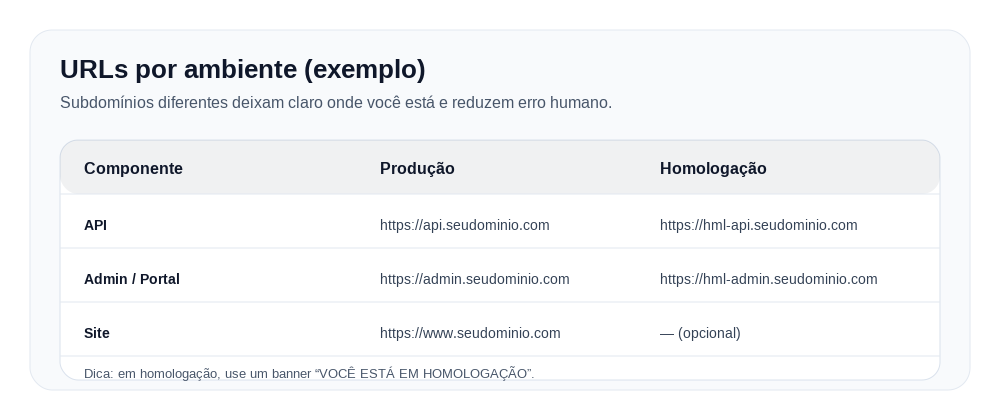
Example of a recommended setup
Production:
https://api.yourdomain.com(app API)https://admin.yourdomain.com(admin portal)https://www.yourdomain.com(website)
Staging:
https://hml-api.yourdomain.com(staging API)https://hml-admin.yourdomain.com(staging portal)
Why is this good?
- It is obvious when someone is in staging (fewer human errors).
- You can set up HTTPS correctly for each environment.
- You reduce the risk of the app pointing to the wrong place.
If you are still at the "we only have an IP address" stage, this post is also worth reading:
DNS pointing (A record): how to create an HTTPS URL for your API
6) How this affects the app on Android and iOS
For the user, "there is only one app". For the team, there are at least two apps in day-to-day work:
- Staging app: for internal testing and validation with the client (UAT).
- Production app: the published app, used by real users.
How to avoid confusion with one simple rule
In the staging app:
- A different name (e.g. "MyApp (HML)")
- A different icon (so nobody mixes them up)
- Points to
hml-api... - Uses test (sandbox) service keys
In the production app:
- The official name
- The official icon
- Points to
api... - Uses production keys
What about app stores and store testing
You do not need to "publish to everyone" to test.
- On Android, you can distribute test versions using testing tracks (for example, internal/closed/open testing) before the production release.
- On iOS, the usual testing flow is through TestFlight, before submitting for review/publication.
The important part here is: the test build must point to staging, and the production build must point to production. This prevents a beta from accessing real data by mistake.
7) How this affects the web admin portal
The admin portal is usually where problems start when there is no separation.
Without a staging environment:
- the team tests directly on the "real" portal
- data changes
- permissions change
- rules change
- and afterwards nobody knows "what was a test and what was real operation"
With separation, it becomes much simpler:
hml-admin...for UAT and validationadmin...for operations
Practical tip: in staging, use a visible banner like "YOU ARE IN STAGING" to prevent human error.
8) A simple recommended process so it doesn't turn into chaos
If you want a "standard" flow that works for most projects:
- Develop and test internally (DEV)
- Push to staging (HML)
- Validate with a checklist per screen/flow (UAT)
- Give the "OK to publish" (clear criteria)
- Publish to production (PROD)
- Monitor and fix quickly (hotfix if needed)
If you want a validation model for steps 3 and 4, this post helps:
How to approve screens and flows quickly, without endless feedback loops
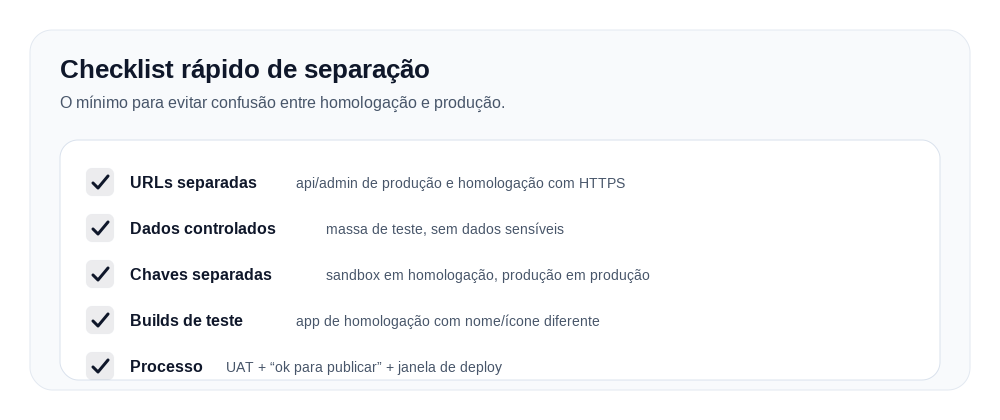
9) Quick checklist of what must exist to separate environments
Use this checklist to align with your team (or your vendor).
Infrastructure / URLs
- There is a production URL (api/admin) with HTTPS
- There is a staging URL (hml-api/hml-admin) with HTTPS
- DNS/subdomains are pointed correctly
Data
- Staging does not use real personal data without a process
- There is a test data set and test accounts
- Keys and integrations are sandbox ones in staging
App and stores
- There is a staging build (different name/icon)
- There is a production build (official)
- The team knows how to distribute for testing (Play Console/TestFlight)
Process
- There is an "OK to publish" checklist
- There is a deploy window and routine (who publishes, when, how to roll back)
- There is minimum monitoring for production (errors, availability)
Common questions with quick answers
Do I need to duplicate everything
Not necessarily. You can reuse infrastructure, but you must separate what is critical: URLs, database/data, keys and process.
Can I use the same database for staging and production
In practice, this tends to recreate the problem (mixed data). The ideal is a separate database. If that is not possible, at the very least separate by database/tables/account, with tightly controlled access.
Can staging have a weak password because it's just for testing
No. Staging is often the easiest target. The rule is: more secure than seems necessary, especially if it holds any real data.
Which is better: staging on the same server or on another one
It depends on the project. For non-technical readers, think of it this way: what matters is not mixing them and not "taking down" production when you change something in staging.
Conclusion
Separating environments is one of those decisions that look like a "technical detail", but that define the quality of the project.
With staging and production well organized, you get:
- more predictability,
- fewer scares during deploys,
- less rework,
- more confidence to evolve the app after launch.
If you want help structuring this (environments, DNS/HTTPS, deploy routine and post-launch operation), X-Apps can support you with governance and ongoing software operation.