
Índice do artigofaltam 10 min de leitura
The rule that sums up this guide: a prototype built with AI proves your idea works. It does not yet prove the product can handle real users, real data, real attacks and two years of evolution. The distance between those two things has a name: software engineering.
A new scene keeps repeating in X-Apps sales conversations in 2026: the client no longer arrives with just an idea on paper. They arrive with a partially built product. A few weeks with Lovable, Bolt, v0, Replit, Cursor or ChatGPT, and the result is impressive: finished screens, working sign-up, a sketched payment flow, sometimes even test users.
The search for a specialized company happens later, when the project grows and starts showing problems no prompt can solve: instability, inconsistent data, fear of a data leak, rising infrastructure costs and the feeling that every new feature breaks two old ones.
This guide maps that whole path: why an AI-built prototype is not a product, which problems show up first, how to audit what the AI wrote, when it is worth fixing, restructuring or rebuilding, and what needs to be ready before putting the application into production.
This article was reviewed on July 31, 2026, with data from studies published by GitClear, Veracode, Stack Overflow and METR, listed in the references at the end.
AI created a new category of software project
For two decades, the start of a digital product had a natural filter: to see the idea working, you had to hire developers or learn to code. Generative AI removed that filter. The term vibe coding, coined by researcher Andrej Karpathy in early 2025, became a synonym for this new beginning: describing what you want in natural language and letting the AI write the code.
With today's tools, a founder or product manager can create, alone:
- complete screens and navigation flows;
- a clickable prototype to validate the idea with customers;
- an initial application with sign-up, login and a database;
- simple integrations, such as a form that sends email or a basic checkout;
- real parts of the product's code.
Adoption is massive: in the 2025 Stack Overflow annual survey, 84% of developers said they use or plan to use AI tools at work. And the phenomenon goes beyond people who code: prompt-based creation platforms brought this capability to people who have never opened a code editor.
The result is a project category that barely existed until recently: the product that reaches the development company already partially built by AI. It is no longer a brief, and it is not yet a finished system. The triggers that usually prompt this search are quite consistent:
- The first paying customers arrived and instability became a revenue risk.
- The product started handling sensitive data and the word LGPD (Brazil's data protection law) entered the conversation.
- A serious integration showed up on the roadmap: ERP, payment gateway, WhatsApp, electronic invoicing.
- An investor or corporate client asked for technical due diligence.
- The AI tool itself could no longer evolve the project without breaking what already existed.
If you recognize yourself in that list, the most important message of this article is: this is not a sign that you made a mistake. The prototype did its job, which was to validate the idea quickly and cheaply. The mistake would be treating that prototype as if it were already the final product.
Why a working prototype is not yet a product
A demo and production answer different questions. The demo answers "does this work?". Production answers "does this keep working with a thousand simultaneous users, real data, malicious people trying to break in and a team evolving the code every week?".
| What the prototype proves | What only production requires |
|---|---|
| The idea makes sense to the user | Stable behavior under load and spikes |
| The main flow works on the happy path | Error handling, retries and edge cases |
| The interface communicates well | Security, access control and auditing |
| It can integrate with other services | Integrations with contracts, queues, monitoring and fallback |
| The database stores and returns data | Data modeling, migrations, backup and recovery |
| One person can evolve the code | A team can evolve the code without regressions |
There is also a well-documented human factor: the feeling of speed with AI is deceptive. In a randomized study by METR published in 2025, experienced developers took on average 19% longer to complete real tasks using AI tools, but came out of the experience estimating they had been 20% faster. The study is small and reflects tools from early 2025, as METR itself notes, but the central point still holds: the perception of progress with AI tends to be greater than the real progress.
The Stack Overflow survey points to the same discomfort from another angle: the number one frustration with AI, cited by 45% of respondents, is solutions that are "almost right, but not quite", and 66% say they spend more time fixing that almost-right code than they would like. In a prototype, almost right gets by. In production, almost right is an incident waiting to happen.
That is why the bar changes when the project grows. We have already explained in detail why AI projects without architecture speed up at first and stall later and why every new feature can break old ones when there are no tests or reviews. This guide starts from the next step: what to do with what has already been built.
The most common problems in projects started with AI
In the assessments we run, the same patterns show up with small variations. The table below sums up where they concentrate:
| Area | Typical symptom in the prototype | Risk when it becomes a product |
|---|---|---|
| Architecture | Everything works, but nobody can explain how | Each change costs more than the previous one |
| Security | Simple login, keys scattered in the code | Data leak, fraud, LGPD fines |
| Database | Data saved without modeling or migrations | Inconsistency, data loss, slowness |
| Scalability | Fast with 10 users | Down with 1,000, or a cloud bill exploding |
| Integrations | Direct calls without failure handling | Lost orders when the partner fluctuates |
| Tests | Almost no automated tests | Silent regressions on every deploy |
| Deployment | Manual publishing through the tool itself | No staging environment, no rollback |
| Maintenance | Only the AI "understands" the code | Total dependence on rewriting by prompt |
| Code ownership | Project stuck on the platform where it was born | Lock-in, dependencies without a clear license |
Four of these areas deserve a deeper dive, because they concentrate most of the cost of fixing.
Architecture and organization: code that repeats itself
AI-generated code tends to solve each request locally, duplicating logic instead of reusing what already exists. GitClear's research on code quality in the age of assistants, which analyzed 211 million changed lines between 2020 and 2024, measured this effect at scale: duplicated code blocks grew eightfold in 2024, and the share of lines dedicated to refactoring fell from 25% in 2021 to less than 10%. It was the first year in the series in which more code was copied than refactored.
In a product, duplication is not a cosmetic detail. Every business rule copied in three places is a rule that will be fixed in one place and forgotten in the other two.
Security: the problem that does not show up in the demo
Security is the area with the hardest numbers. Veracode's GenAI Code Security report, which tested code generated by more than 100 language models, found OWASP Top 10 security flaws in 45% of samples. In Java, the failure rate reached 72%. And one of the most important findings: newer and larger models write more functional code, but not significantly more secure code.
In practice, assessments always find the same list: API keys and secrets written directly in the code, authentication without MFA, authorization checked only in the interface (and not in the backend), personal data flowing with no clear rules and no record of who accessed what. For a product operating in Brazil, this is not just a technical risk: it is an LGPD liability.
Database: invisible decisions that cost a lot
The prototype saves and returns data, and that creates the impression that the database is solved. But data modeling is the kind of decision the AI makes on autopilot and that gets expensive to change later: free-text fields where there should be relationships between tables, missing indexes, no schema migration strategy, no backup and test data mixed with real data. When volume grows, these shortcuts turn into slowness and inconsistency that users notice.
Ownership and traceability: whose code is this?
Projects started on prompt-based creation platforms bring an extra question: what happens when you want to leave? You need to check whether the code can be fully exported, what depends on the platform's proprietary services, which third-party dependencies entered the project (and under which licenses) and whether there is a version history that lets you understand how it evolved. Without that, the business is hostage to the tool where the prototype was born.
How to audit a project built with AI
Auditing is not judging the prototype by the standard of a mature system. It is answering, with evidence, three questions: what is worth keeping, which risks need immediate action and what is the cheapest path to a reliable product.
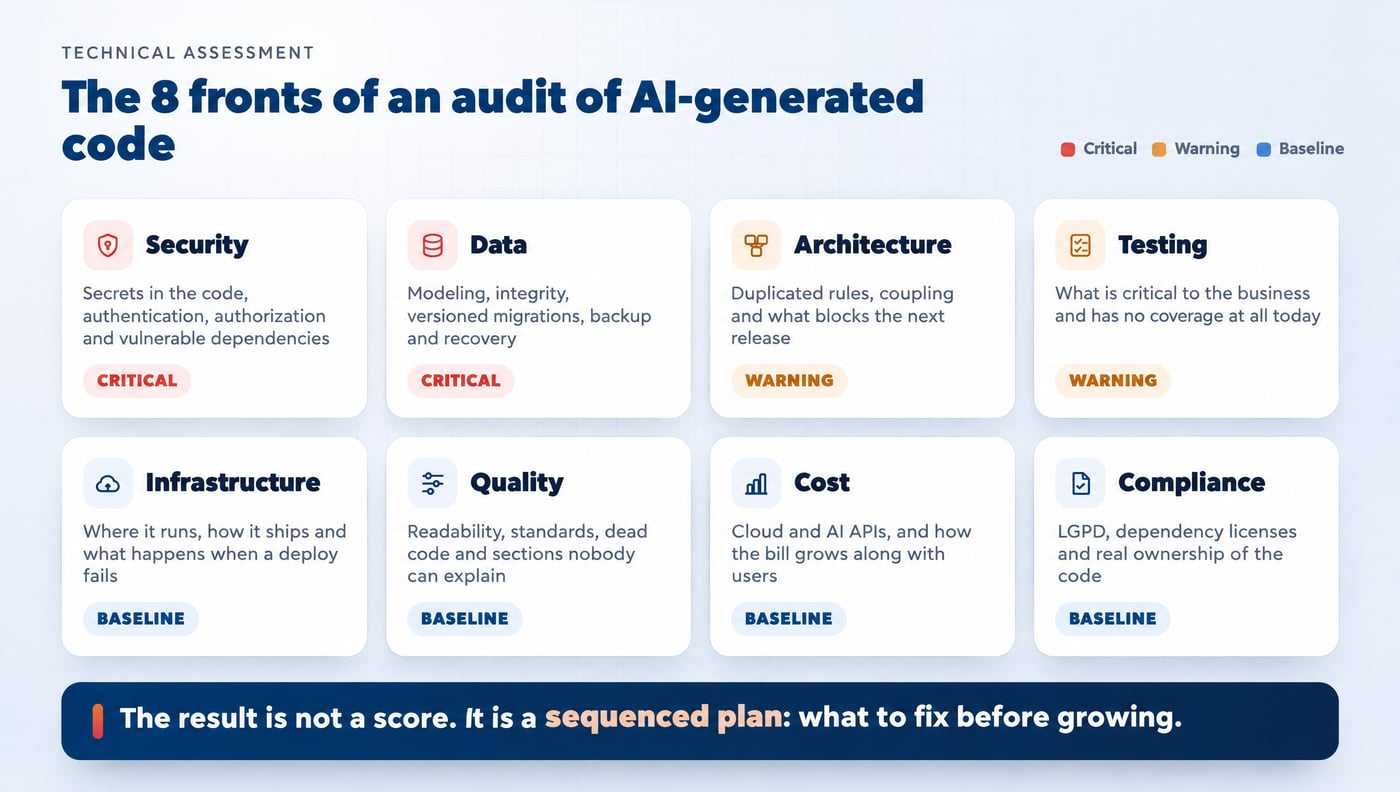
A serious technical assessment covers eight areas:
- Architecture: how the code is organized, where there is duplication, what is too coupled to evolve.
- Security: exposed secrets, authentication and authorization, input validation, vulnerable dependencies, exposure of personal data.
- Data: modeling, integrity, indexes, migrations, backup and recovery plan.
- Code quality: readability, standards, dead code, snippets not even the AI can explain.
- Tests: what is covered, what is critical and uncovered, how to prevent regressions.
- Infrastructure and deployment: where it runs, how it is published, whether there is a separate staging environment, what happens when a deploy goes wrong.
- Cost: cloud and API consumption (including AI APIs), and how it grows with the number of users.
- Compliance: LGPD, platform terms, dependency licenses, code exportability.
The useful result of an audit is not a score, but a report with risks ranked by severity and a sequenced plan: what to solve before any launch, what can be done in parallel and what can wait. At X-Apps, this work has a name and a fixed scope: technical assessment of a project built with AI, covering exactly these eight areas.
Fix, restructure or rebuild?
With the assessment in hand, there are three possible paths, and the wrong choice costs months. The matrix we use to guide this decision:
| Criterion | Fix | Restructure | Rebuild |
|---|---|---|---|
| Business rules in the code | Correct and clear | Correct, but scattered | Confusing or wrong |
| Security | Point adjustments | Serious flaws, usable base | Structural flaws |
| Data modeling | Adequate | Needs a planned migration | Needs to start over |
| Stack and dependencies | Market standard | Market standard with excess | Tied to a platform or obsolete |
| Estimated cost | Weeks | 1 to 3 months | Comparable to a new project |
Three practical rules help decide:
- Fixing is worth it when the prototype was born with some discipline (common stack, exportable code, correct logic) and the problems are localized: closing security gaps, covering critical flows with tests, organizing deployment.
- Restructuring is the most common path for the projects that reach us: the validated business logic is preserved, but it gains architecture, correct data modeling, tests and professional infrastructure. The end user barely notices; the development team notices every day.
- Rebuilding stops being taboo when the cost of fixing exceeds the cost of redoing it on a solid base. And here it is worth recording what we always tell clients: the prototype was not a waste. It validated the idea, defined screens and flows and became the most precise specification an engineering team could receive. Rebuilding with a validated prototype in hand is much faster and cheaper than starting from scratch.
One important detail: rebuilding does not mean abandoning AI. It means using it inside a pipeline with architecture, review and tests, where it speeds things up without destroying them.
How to prepare the application for production
Whichever path you choose, preparing for production covers a known set of areas. This is the roadmap we follow:
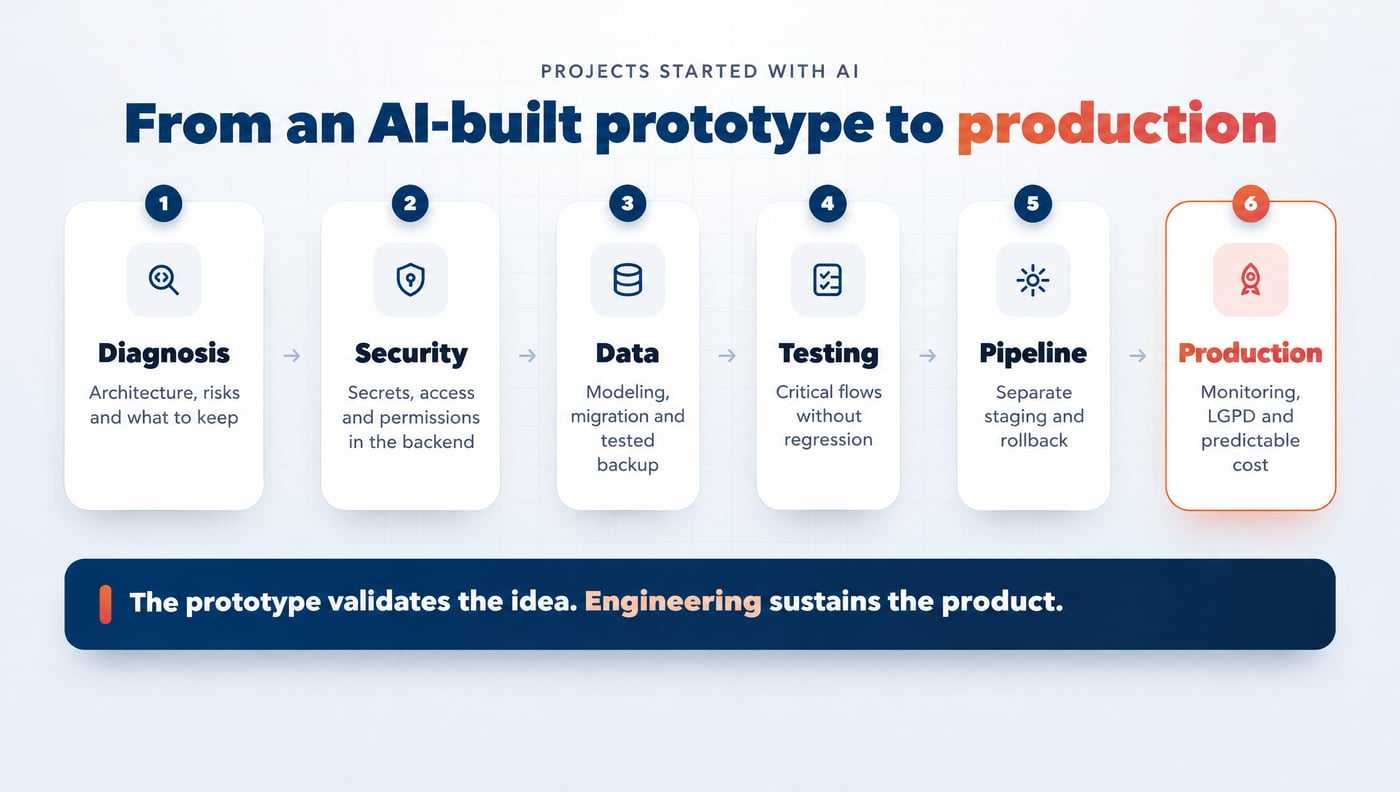
- Secrets and access: take keys and passwords out of the code, centralize them in a secrets vault, rotate everything that has already leaked in a commit.
- Authentication and authorization: a login model suited to the product, MFA where it makes sense and permissions validated in the backend, never only on the screen.
- Data: reviewed modeling, versioned migrations, tested automatic backup (a backup that has never been restored is not a backup).
- Tests for critical flows: sign-up, login, payment and the core of your business covered by automated tests before any large refactoring.
- Environments and pipeline: staging separate from production, automated deploy, rollback in one command.
- Observability: structured logs, error alerts and performance monitoring, to find the problem before the customer does.
- LGPD and privacy: map personal data, define retention, an account deletion flow and the legal bases for processing.
- Predictable cost: size the recurring operating costs, including AI API consumption, which is usually the most underestimated item on the bill.
If the product uses AI in its own features (a chat, a copilot, an automation), the list gains an extra layer of metrics, logs and evaluations specific to LLMs in production. And if the destination includes the app stores, it is worth following the complete checklist for publishing on the App Store and Google Play.
The new role of software houses
This new project category also changes the work of those who develop software professionally. The old model was binary: the company hired the whole project or nothing at all. The model taking shape has more entry points: assessing, taking over, restructuring and scaling products that AI helped start.
At X-Apps, this is not an anti-AI stance, quite the opposite: we use AI agents in our own development pipeline, with planning, human review and acceptance criteria defined by engineers. The difference between our use and pure vibe coding is not the tool, it is governance: architecture decided before the prompt, code reviewed by people accountable for the result, tests that prevent regressions and a pipeline that publishes safely. That combination shortened stages and made projects smaller and faster, without giving up technical responsibility.
It is the same logic we describe in the third era of programming with AI: AI executes more and more, and precisely because of that, decisions about architecture, security and quality become more valuable, not less.
For those who arrive with a project started by AI, the software house's role is to give back three things no prompt delivers: a clear path (what to fix, in what order, for how much), technical accountability (someone who answers for what is in production) and sustainable speed (AI keeps speeding things up, now without breaking what already works).
Frequently asked questions about projects built with AI
Is AI-generated code fit for production?
Yes, as long as it goes through the same rigor as any code: review, tests, security analysis and architecture defined by someone who understands the whole product. Current data calls for caution with unreviewed code: 45% of AI-generated samples failed security tests in the Veracode study, and GitClear's research shows duplication growing and refactoring falling in real repositories.
Do I need to throw away what I built with AI?
In most cases, no. Of the projects we assess, most go on to restructuring: the validated logic is preserved and gains an engineering foundation. A full rebuild is reserved for cases where fixing costs more than redoing, and even then the prototype remains useful as a living specification of the product.
How much does it cost to turn an AI-built prototype into a product?
It depends on three factors the assessment measures: the state of what exists (how much is usable), the business risk (a fintech with sensitive data demands more than an internal catalog) and the product's ambition (10 internal users or 100,000 customers). The technical assessment exists precisely to replace guesswork with a plan with fixed scope and price per stage.
What are the risks of keeping my app as it is?
The four most common: a security incident involving customer data (with LGPD consequences), downtime at the moment of commercial traction, cloud and API costs growing faster than revenue, and development paralysis, when every new feature breaks two old ones and the team loses the confidence to ship.
Does X-Apps take on projects started in Lovable, Bolt, v0, Replit or with Cursor and ChatGPT?
Yes. The process starts with the technical assessment of the eight areas described above, moves to a fix or restructuring plan with fixed scope and continues, when the client wants, with the ongoing evolution of the product by one of our squads.
Checklist: before putting a project built with AI into production
- No secrets (key, password, token) written in the code
- Authentication with MFA available and authorization validated in the backend
- Data modeling reviewed, with versioned migrations
- Automatic backup tested with a real restore
- Critical business flows covered by automated tests
- Staging environment separate from production
- Automated deploy with simple rollback
- Logs, error alerts and performance monitoring active
- Personal data mapped, with retention and deletion defined (LGPD)
- Monthly infrastructure and API cost projected for 10x current usage
- Code exported from the original platform, versioned in your own repository
- Dependencies audited, with licenses compatible with commercial use
References
- GitClear: AI Copilot Code Quality, analysis of 211 million lines
- Veracode: 2025 GenAI Code Security Report
- Stack Overflow Developer Survey 2025: AI section
- METR: Measuring the Impact of Early-2025 AI on Experienced Developer Productivity
The AI-built prototype was the fast part, and it did its job. The part that turns that prototype into a business that works every day is called engineering, and that is exactly where we can help.