
Índice do artigofaltam 20 min de leitura
The question almost always arrives in the same format: which of these three delivers the best design? The honest answer is that the question hides a trap, because Claude Design, Figma and Canva do not compete for the same stage of the work.
Figma has the highest quality ceiling. Claude Design has the greatest ability to turn a complex brief into creative direction. Canva has the highest quality floor and the best efficiency for producing many pieces. These three sentences do not contradict each other.
This article breaks quality into measurable dimensions, shows what public evidence already says about AI in graphic design, corrects a common confusion about model choice, and ends with cost calculations that almost never show up in comparisons.
Executive summary
| Verified fact | What it changes in the decision |
|---|---|
| Claude Design became an artifact template inside Claude, on all plans, including Free, and the separate site closes on December 14, 2026 | Multi-person editing is still basic and there is no version history: do not treat it as the single source of truth for brand files |
| Claude Design was announced running on Claude Opus 4.7 and the documentation does not say which model it uses today | Choosing between Opus 5.5 and Fable 5.2 with measurable cost is an API and Claude Code decision |
| Claude Design usage counts toward the same pool as the rest of Claude, including Claude Code | A heavy design project competes with your development quota |
| Fable 5.2 costs exactly double Opus 5.5 per token (US$ 8/US$ 40 versus US$ 4/US$ 20) | The doubled price has to pay for itself in avoided decisions, not in pixels |
| Figma Buzz runs on a Collab seat at US$ 3/month billed annually | Marketing scale with governance can cost less than a production license |
| Figma AI credits do not roll over and are not transferable | The allowance is individual, so the bottleneck shows up in the heaviest user |
| Canva AI 2.0 generates designs as editable objects, not a flattened image | Canva is no longer just templates and now competes in generation |
| GraphicDesignBench shows the gap in spatial reasoning, faithful vectors and fine typography | Precision is still human work in a professional tool |
Why the direct comparison is misleading
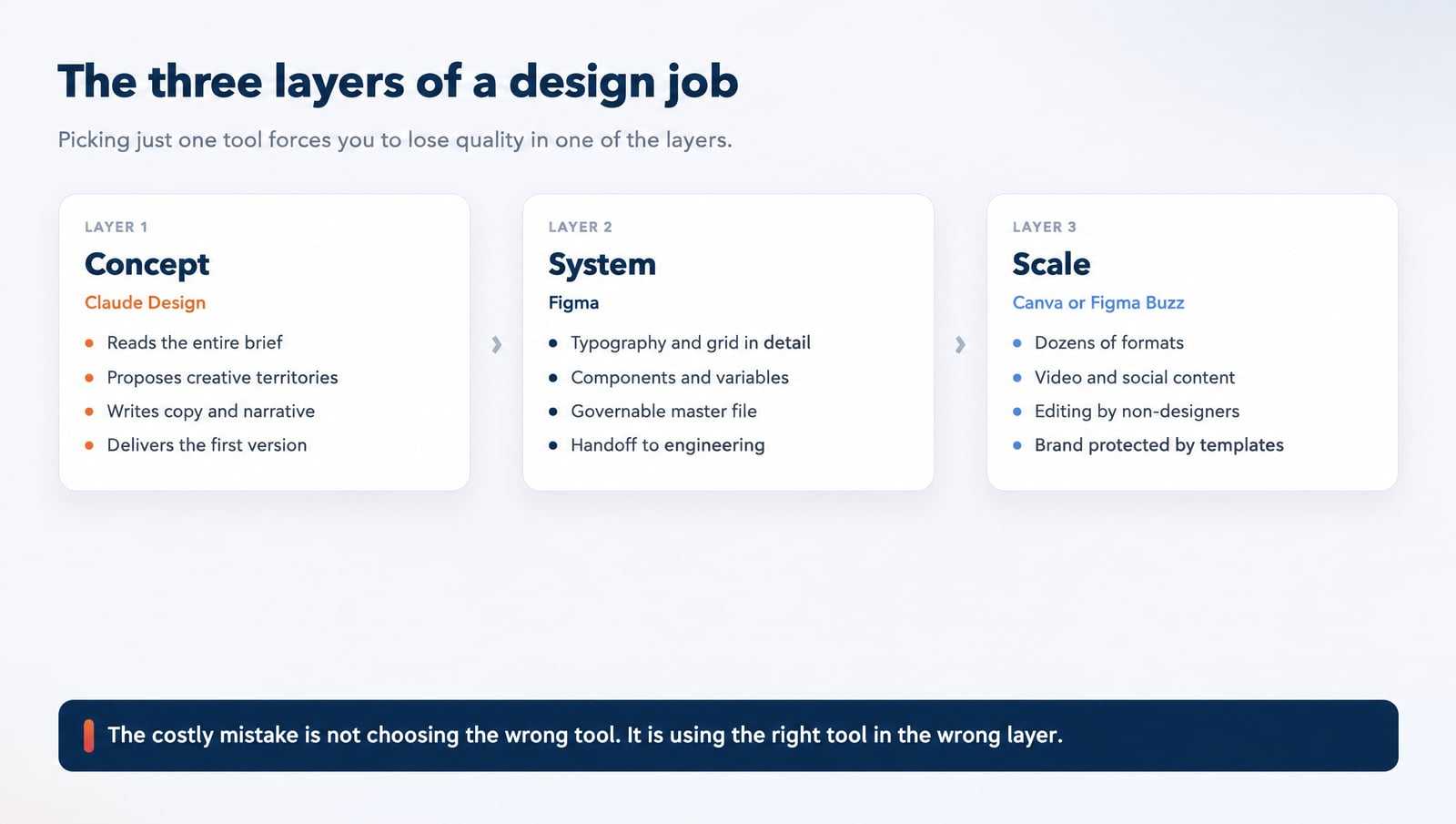
Serious graphic design work has three layers with different demands:
- Concept. Understanding the business, the audience and the message, and proposing a visual territory that sets the brand apart.
- System. Turning the approved direction into grid, typography, components, tokens and reusable rules.
- Scale. Producing dozens or hundreds of adaptations without destroying coherence.
Claude Design is strong in layer 1 and reasonable in layer 2. Figma dominates layer 2 and, with Buzz, has entered layer 3. Canva dominates layer 3 and has improved a lot in layer 1 since Canva AI 2.0.
When someone says a tool "delivers more quality", they are almost always talking about the layer that matters most in their own work. That is why designers champion Figma, marketing teams champion Canva and those with little design structure champion Claude Design. They are all right within their own layer.
What quality means in graphic design
A piece can look beautiful at first glance and still be technically mediocre. To compare without falling back on personal taste, it is worth separating at least these dimensions:
- Conceptual quality: does the idea represent the product and set the brand apart?
- Art direction: is there an intentional visual language or just a pleasant combination of elements?
- Hierarchy: does the eye move through the piece in the right order?
- Typography: are font, weight, line spacing, tracking, optical alignment and line breaks correct?
- Composition: were grid, rhythm, scale and negative space worked on?
- Originality: does it look like a specific creation or an adapted template?
- Consistency: does the direction survive 20, 50 or 100 pieces?
- Editability: is the material structured or just a pretty image?
- Production accuracy: are formats, margins, responsiveness, accessibility and exports right?
- Scalability: can you derive dozens of pieces without rework?
Each tool wins on different parts of this list, and that is exactly where public evidence helps.
What research already measures
In April 2026, GraphicDesignBench was published, described as the first comprehensive suite to evaluate AI models across the breadth of professional graphic design tasks. It has 50 tasks across five axes (layout, typography, infographics, template semantics and animation), evaluated in two modes: understanding and generation.
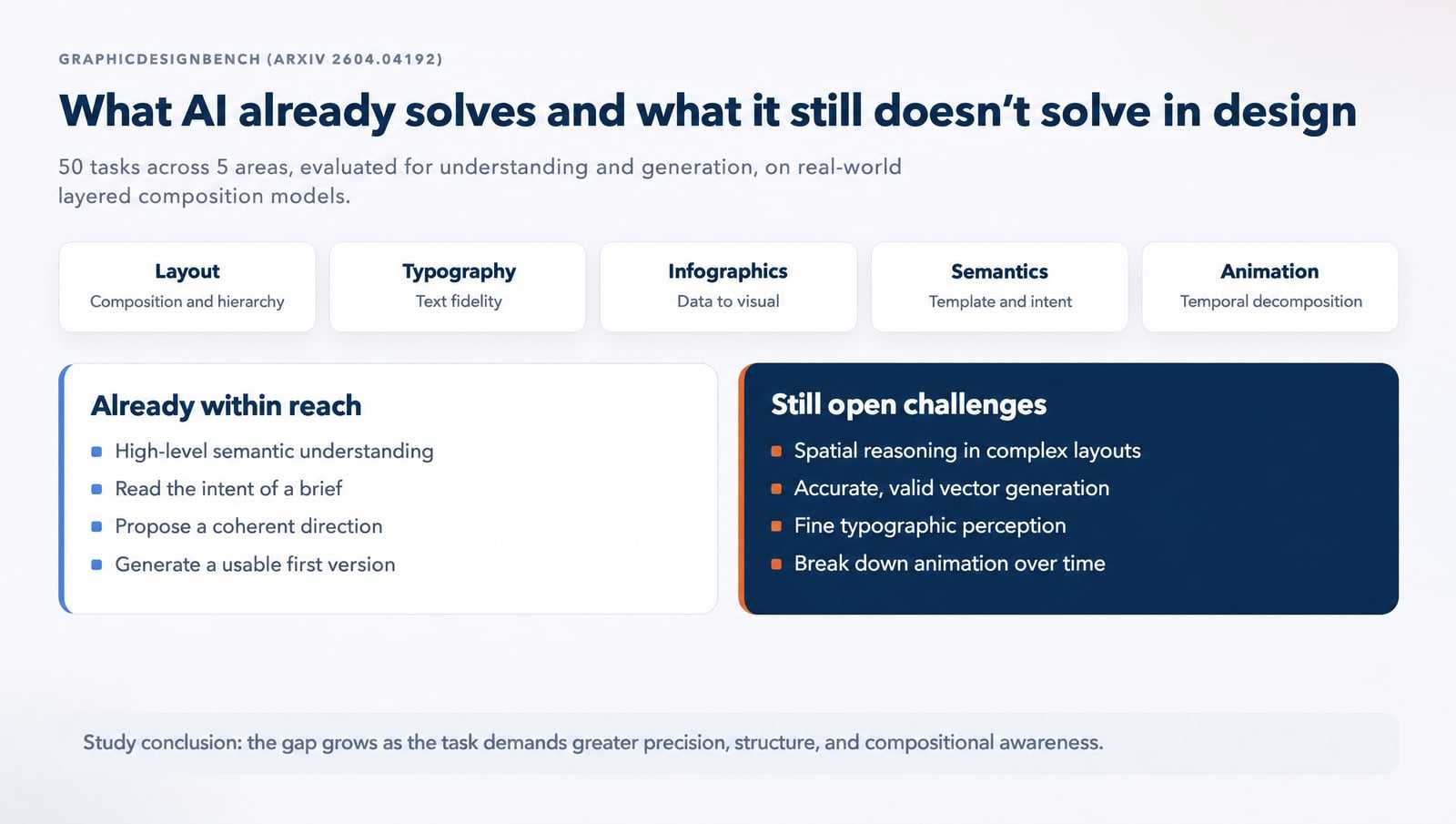
The study's conclusion is direct and useful for anyone choosing a tool:
- high-level semantic understanding is already within reach of current models;
- spatial reasoning in complex layouts, faithful vector generation, fine typographic perception and temporal decomposition of animation remain largely unsolved;
- the gap grows as the task demands precision, structure and awareness of composition.
Translated into the practical decision: AI is already reliable for interpreting intent and proposing a path. It is not yet reliable for millimeter-perfect finishing. This backs, with evidence, the split into layers described above.
It is worth noting the limit of this evidence: GraphicDesignBench evaluates models, not products. As of this publication, there is no independent benchmark that runs the same complete brief through Claude Design, Figma and Canva and scores the final result.
Claude Design: what it actually is
Claude Design was born as an Anthropic Labs product, on its own site, and today is one of Claude's artifact templates: you can use it in any conversation, in the Artifacts tab, in Claude Code and in the iOS and Android apps. The separate site at claude.ai/design closes on December 14, 2026. The logic remains the same: a conversation panel and a canvas. You describe what you need, Claude generates a first version, and refinement happens through conversation, comments on specific elements and direct editing on the canvas.
What it really does differently:
- imports a design system from a GitHub repository, design files, uploads or a local base, and checks its own output against that system before displaying it;
- exports to PDF, PPTX, Google Slides, standalone HTML and ZIP, plus sharing with view, comment or edit permission;
- connects with tools from Adobe, Base44, Canva, Gamma, HubSpot, Lovable, Miro, Netlify, Replit, v0, Vercel and Wix;
- hands off to Claude Code, with sync commands between the two ends.
The central advantage is not "designing automatically". It is understanding a request like this one without an intermediate translation:
"We need to launch a risk management platform for the chemical industry. The communication should convey institutional credibility and technological sophistication, without looking like a generic fintech. The audience is made up of logistics, compliance and safety executives."
No canvas tool solves this starting from a menu. The model solves it because the problem is one of language before it is one of layout.
The limitations the documentation itself admits
Claude Design's help center is honest about the product's stage and, in November 2026, lists among its known limitations:
- inline comments that sometimes do not appear;
- slowness with very large repositories;
- multi-person editing that is still basic and may not work reliably;
- chat errors that require opening a new tab;
- no version history;
- sharing settings only on web and desktop, not in the mobile apps.
This does not disqualify the tool. It just defines its role: an engine for concept and first versions, not an official brand repository with several people editing at the same time.
The correction that changes the original question
Here is the point that causes the most confusion: there is no documented choice between Opus 5.5 and Fable 5.2 inside Claude Design, the way you choose a model in Claude Code or in the API.
The official announcement describes Claude Design running on Claude Opus 4.7, presented as Anthropic's most capable vision model at the time. Since then, Design has become an artifact template inside the conversation, but neither the product page nor the help center (checked in November 2026) says which model generates the design or whether it follows the conversation's model selector.
So the comparison between Opus 5.5 and Fable 5.2 still holds, but it belongs to another place in the workflow: the API and Claude Code, where you actually control that choice and pay per token. That is where the decision has a measurable cost impact.
Figma: the highest ceiling and the seat math almost nobody does
Figma is no longer a single product. Today the umbrella includes Figma Design, Draw, Slides, Make, Motion and Buzz. For professional finishing it still has no close competitor, because nothing stops the designer from controlling kerning, tracking, line spacing, modular grid, vertical rhythm, vector curves, masks, constraints, components, variants, variables, color modes and responsiveness.
The difference shows in the granularity of the request. In Claude Design or Canva you say:
"Make the title a bit more balanced."
In Figma the designer decides exactly: 56 to 54 px, tracking of minus 1.5%, maximum width of 620 px, break after the second word, line height of 58 px and 32 px of spacing to the subtitle.
A high ceiling does not mean a high floor
This is the point almost every comparison gets wrong. Figma delivers control, not repertoire. A weak professional in Figma produces a worse result than a non-designer using a good template in Canva. The correct sentence is not "Figma is prettier than Claude". It is: a great professional takes the material further in Figma than in the other two.
Seats and credits: where the real cost lives
Figma's pricing model is by seat type, and that is where almost every estimate goes wrong.
| Plan | Full | Dev | Collab |
|---|---|---|---|
| Professional (annual) | US$ 16 | US$ 12 | US$ 3 |
| Organization (annual) | US$ 55 | US$ 25 | US$ 5 |
| Enterprise (annual) | US$ 90 | US$ 35 | US$ 5 |
The monthly AI allowance follows the same logic:
| Seat and plan | AI credits per month |
|---|---|
| Full on Starter | 500, capped at 150 per day |
| Full on Professional | 3,000 |
| Full on Organization | 3,500 |
| Full on Enterprise | 4,250 |
| Dev, Collab and View | 500 |
Three details that change planning:
- credits are individual and cannot be transferred between team members;
- they do not roll over from one month to the next;
- consumption varies a lot by action: removing a background costs few credits, while generation in Figma Make can consume dozens per task.
In other words, the allowance does not belong to the team. It belongs to the person. If one designer concentrates all the generation, they run out first and the rest of the team is left with idle credits.
There is also an important temporary effect: Figma's AI agent is free during the beta phase and does not consume credits, but it will start consuming them when it reaches general availability. Any projection made today based on the agent is underestimating the future cost.
Figma Buzz changes the comparison with Canva
Buzz exists precisely to let designers publish templates and lock what can be edited, so that marketing produces ads, posts, one-pagers and event materials without leaving the brand. And it is available on all seat types, including the Collab seat at US$ 3 per month billed annually.
This fixes a historical weakness of Figma: putting material in the hands of non-designers without handing over the key to the master file.
Canva: the highest quality floor
Canva was built so that someone without technical mastery could produce something visually acceptable quickly. The advantage was never only the AI. It lies in the combination of templates, photos, videos, animations, illustrations, icons, mockups, fonts, ready formats, resizing, image editing, video editing, publishing and brand kits.
The structural point: Canva reduces the number of decisions the user needs to make. That raises the floor.
- In Figma you can start with a completely empty canvas.
- In Canva you usually start with an already tested visual structure.
- In Claude Design you start with a conversation and delegate the interpretation of the brief.
Canva AI 2.0 changed the tool's position
In April 2026, at Canva Create, the company presented Canva AI 2.0 and the Canva Design Model, described as a foundation model specific to design. The changes relevant to this comparison:
- generation in editable objects and layers, not a flattened image;
- Magic Layers, which turns a generated image into an editable design, with text becoming a text box and objects becoming manipulable elements;
- brand memory, applying rules automatically across projects;
- campaign generation in multiple formats from a single brief;
- importing artifacts from AI tools, including Claude outputs, to turn them into a publishable site or document inside the editor.
The difference in origin is still visible. Claude tends to start by reasoning about the brief. Canva tends to start with production inside its own visual ecosystem. One is a strategist who also designs; the other is a design platform that now also reasons.
AI allowances in Canva
Canva organizes AI usage into classes, and the math changes depending on the tool used. On paid plans, the published monthly allowance follows this logic:
| Plan | Standard uses | Premium uses | Ultra uses |
|---|---|---|---|
| Pro | 2,000 | 200 | 20 |
| Business | 4,000 | 400 | 40 |
The heaviest functions, such as conversational design and text to video, consume the Ultra class and run out quickly under heavy use. There is a paid add-on to expand the allowances.
Where Canva loses
The typical risk is not that the material looks ugly. It is that it looks familiar. People look at it and think: "it looks professional, but it looks like Canva". This shows up mainly in:
- new, original visual identity;
- very refined editorial typography;
- complex vector systems and custom illustration;
- layouts with an unusual grid;
- product prototyping and design systems tied to development.
You can reduce this effect a lot with your own art direction, templates built from scratch, exclusive photography and proprietary typography. But the environment naturally favors speed and standardization.
Who wins in each dimension
This is a practical assessment of the tools' architecture and workflow, not a scientific benchmark.
| Dimension | Winner | Reason |
|---|---|---|
| Understanding an ambiguous brief | Claude Design | Connects strategy, audience, content and intent |
| Proposing creative territories | Claude Design or a designer in Figma | Claude explores fast; the professional goes further |
| Best first result without a designer | Canva or Claude Design | Canva delivers predictable finishing; Claude delivers something specific |
| Maximum originality | Figma with a senior designer | Not stuck with the generator's choices |
| Refined typography | Figma | Detail control that research shows is AI's weak spot |
| Vector and illustration | Figma | Superior vector editing and manual control |
| Layout precision | Figma | Grid, alignment, constraints and per-element control |
| Design system governance | Figma | Components, libraries, variables and modes |
| Automatically generated consistency | Claude Design | Good when it receives a complete, organized design system |
| Mass production | Canva | Adapting, resizing, reusing and publishing |
| Mass production with brand locks | Figma Buzz | Marketing edits only what the designer unlocked |
| Integrated media library | Canva | Less dependence on external stock libraries |
| Handoff to development | Figma | Inspection, tokens and integration with engineering |
| Cost per adaptation | Canva or Figma Buzz | Avoid regenerating each piece from scratch |
| Cost per strategic concept | Claude Design | Cuts hours of briefing, copy and exploration |
Where the model really changes the result
Since Claude Design does not document model selection, the choice between Opus 5.5 and Fable 5.2 has a measurable cost when you use Claude via the API or Claude Code (chat also has a model selector, but on the Pro and Team Standard plans Fable only runs on usage credits): generating copy, structuring a campaign, building a presentation, writing landing page HTML, checking consistency or automating the derivation of pieces.
And here it is worth clearing up another confusion: the model does not paint every pixel. It interprets the brief, plans the composition, chooses structures, writes content, operates tools, reviews its own work and sustains consistency throughout the process. Switching from Opus to Fable does not make a banner twice as beautiful. It makes the process more capable of sustaining difficult decisions for longer.
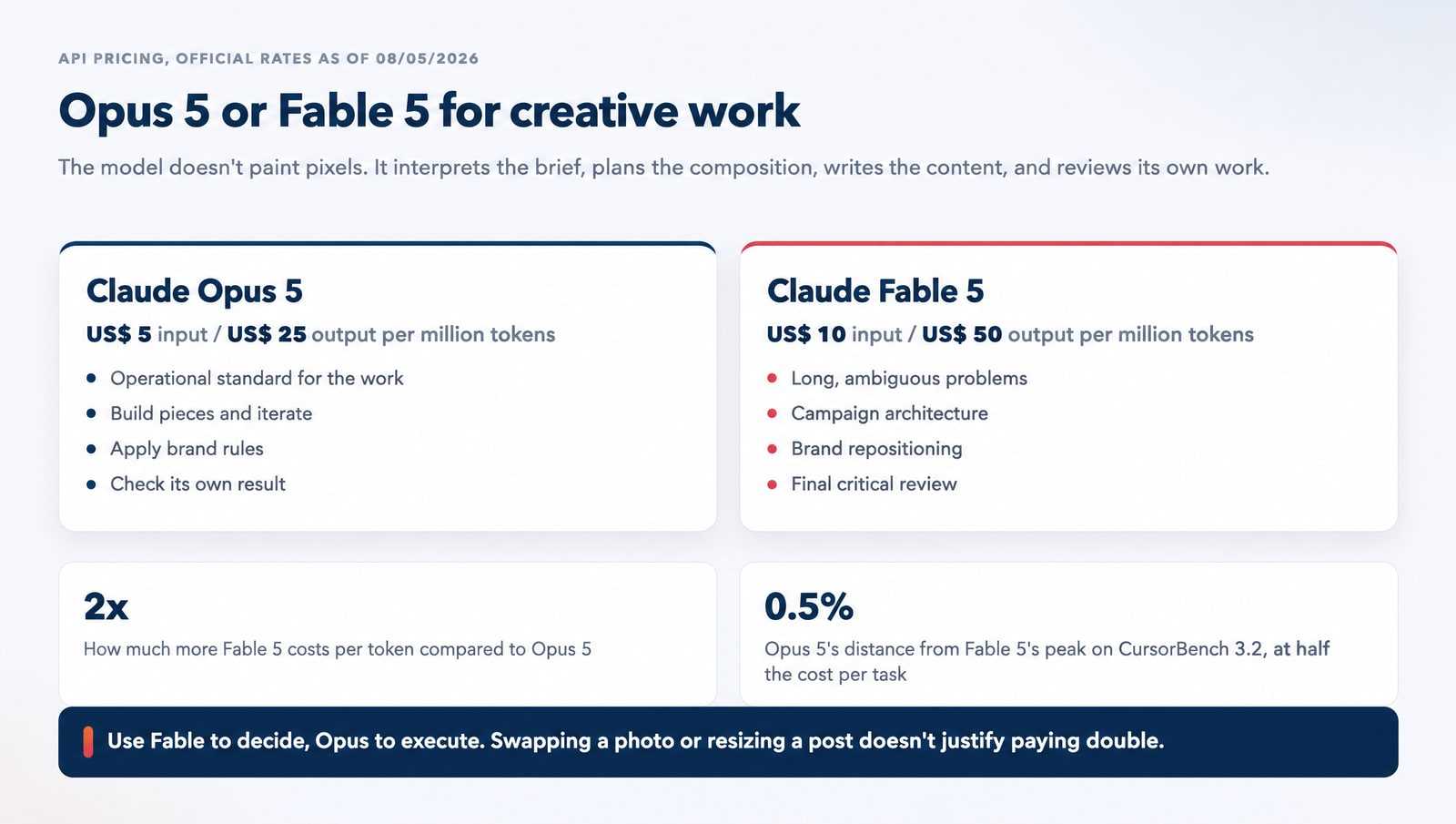
The illustration shows the August 2026 generation (Opus 5 and Fable 5). The two-to-one ratio per token has held in the current generation, Opus 5.5 and Fable 5.2.
Current API pricing
| Model | Input per million tokens | Output per million tokens |
|---|---|---|
| Claude Sonnet 5.5 | US$ 2 | US$ 10 |
| Claude Opus 5.5 | US$ 4 | US$ 20 |
| Claude Fable 5.2 | US$ 8 | US$ 40 |
Figures from Anthropic's official table, checked on November 10, 2026. Opus 5.5 came out on September 22 and Fable 5.2 on November 9, 2026. The previous generation is still on the table: Opus 5 at US$ 5 and US$ 25, Fable 5 and Fable 5.1 at US$ 10 and US$ 50. Sonnet 5 stayed at US$ 2 and US$ 10: the price announced as introductory until August 31, 2026 became the standard, and the planned increase to US$ 3 and US$ 15 did not happen. Fast mode costs double the standard rate: US$ 8 and US$ 40 on Opus 5.5, US$ 16 and US$ 80 on Fable 5.2.
The data point that weighs most in the decision
In the original publication of this article, the central data point came from the Claude Opus 5 announcement: Anthropic reported Opus 5 within 0.5% of Fable 5's peak on CursorBench 3.2, at half the cost per task. The current generation changes that reading in two ways.
In the Opus 5.5 announcement, Anthropic says it works at Fable 5.1's level on most tasks and costs 40% less to run than Opus 5 on typical workloads.
In the Fable 5.2 announcement, Anthropic reports the model as a step above Opus 5.5 on almost everything it evaluated, and measures cost per task, not per token. On FrontierCode 2.0, in Anthropic's initial tests, Fable 5.2 at High effort ties with Opus 5.5's best result, at Max effort (45.3% versus 45.5%), for about half the cost per task. On Chartography, which measures reading of charts and figures, Fable 5.2 at Medium effort comes out ahead of Opus 5.5 at Max (66.4% versus 64.4%) for less than a tenth of the cost per task.
These are vendor figures, not independent third-party data. Even so, Anthropic itself recommends starting with Opus 5.5 for most coding and knowledge tasks and moving up to Fable when scope and complexity call for it.
How this becomes a practical rule
Use Fable 5.2 at three moments:
- Creative architecture: interpreting an open problem and proposing truly different territories.
- Choice and consolidation: comparing alternatives and turning the winner into a system.
- Final critical audit: finding inconsistencies and weaknesses that went unnoticed.
Use Opus 5.5 for the rest: building the pieces, iterations, applying brand rules, refining copy, checking consistency and implementing feedback.
The break-even is simple. Since Fable costs double per token, it needs to use about half the tokens, eliminate about half the attempts, or save enough human time to compensate. The first hypothesis became more plausible with Fable 5.2: at a lower effort it can tie with Opus 5.5 at maximum effort while spending less. So compare configuration against configuration (model and effort level), not model against model. In professional work, the third hypothesis is the one that shows up most: avoiding a wrong creative direction or three rounds of revision easily pays the difference. Resizing a post does not.
Access to Fable by plan
If you use Claude on a subscription rather than via the API, the rule for accessing Fable changed on July 19, 2026, when the promotion that unlocked Fable 5 within the weekly limit ended. Today the rule applies to all Fable models, including 5.2:
| Plan | How Fable is charged |
|---|---|
| Free | Unavailable |
| Pro, Team Standard and Enterprise Standard (seat, legacy plan) | Usage credits only |
| Max, Ultra, Team Premium and Enterprise Premium (seat, legacy plan) | Included up to 50% of the weekly limit, then by credits |
| Usage-based Enterprise and API | Charged at standard API rates |
Pay attention to the detail: the 50% is not extra capacity. It is a slice of the same weekly limit the other models consume.
The three costs people confuse
Almost every comparison stops at "how much the subscription costs". There are three layers of cost, and the third is the one that decides.
Layer 1: subscription
| Tool and plan | Reference price | Approx. in Brazilian reais |
|---|---|---|
| Figma Professional, Full seat | US$ 16/month billed annually | about R$ 82 |
| Figma, Collab seat | US$ 3/month billed annually | about R$ 15 |
| Claude Pro | US$ 17/month billed annually, US$ 20 monthly | about R$ 88 |
| Claude Max (5x Pro usage) | US$ 100/month | about R$ 515 |
| Canva Business | per person/month, no seat minimum | varies by region |
The conversion uses a reference rate of R$ 5.15 per dollar and serves only as an order of magnitude, without IOF (Brazil's tax on financial transactions), other taxes or spread. Canva uses regional pricing and charges in reais in Brazil, so the official page is the only reliable source for your case.
Layer 2: AI allowance
Here the three behave quite differently:
- Claude: variable cost, tied to model, context and number of iterations, with the added catch that Design, Claude Code and chat share the same pool.
- Figma: credits per seat, predictable in total but variable per action, individual and with no rollover.
- Canva: allowances per usage class, easy to understand at volume, with a paid add-on to expand them.
On operational predictability, Canva and Figma win. On intelligence per operation, Claude wins.
Layer 3: cost per approved piece
This is the only metric that really matters:
cost per approved piece = subscription + additional AI + assets + production hours + review + rework + adaptation + publishing
When you apply this formula, the reading changes:
| Tool | Where it lowers cost | Where it raises cost |
|---|---|---|
| Figma | Lower technical risk in the final file and high reuse | Requires expertise; human cost is the biggest component |
| Canva | Cuts hours and dependence on a designer for adaptations | Risk of generic results if the system is not well built |
| Claude Design | Greatly cuts briefing, concept and first version | Less predictable consumption and rework at handoff |
The tool with the cheapest monthly fee is not necessarily the one that produces the cheapest approved piece.
A concrete team calculation
Consider a team of four people: one designer and three in marketing.
| Setup | Monthly math | Total |
|---|---|---|
| Figma with Buzz | 1 Full (US$ 16) + 3 Collab (US$ 9) | US$ 25 |
| Canva Business | 4 seats at the per-person monthly price | 4x the per-seat price |
Figma comes out cheaper in this scenario. But the difference does not buy "more quality": it buys governance and continuity with the master file. What Canva delivers on top is operational breadth: media library, video, presentations, publishing and a gentler learning curve. If your sales team needs to produce on its own, that breadth is usually worth the delta.
Decision matrix by type of work
| Work | Best workflow |
|---|---|
| Visual identity and branding | Claude for strategy and territories, Figma for the final build, Canva for application templates |
| Campaign key visual | Claude for concept, Figma for the final piece, Canva or Buzz for adaptations |
| Campaign with 50 formats | Claude creates the architecture, Figma becomes the master, Canva or Buzz produce the variations |
| Premium sales presentation | Claude structures the narrative and first version, Figma does the finishing |
| Recurring sales presentation | Canva, for distributed editing and versioning by the team |
| Product interface or system | Figma, for components, variants, prototype and handoff |
| Posts, ads and social | Canva for non-specialist teams, Buzz when the brand is strict |
| Landing page and one-pager | Claude Design with handoff to Claude Code, review in Figma |
In a campaign with many formats, generating 50 times in Claude is the classic mistake: it increases consumption, inconsistency, the risk of visual drift and review rework. The right way is to generate a system and derive the pieces systematically.
The stack I would recommend
For anyone who wants the best result without inflating cost:
- Figma as the official source. Identity, components, grids, master templates, key visuals, library and approved files.
- Claude Design as the intelligence layer. Interpreting the brief, organizing references, proposing concepts, producing copy, structuring presentations, creating first versions and critiquing its own design.
- Fable 5.2 only at high-value moments, via the API or Claude Code: campaign architecture, positioning, exploring territories and final audit.
- Opus 5.5 as the operational default for everything that is building, iterating and applying rules.
- Canva or Figma Buzz for scale. Canva when the priority is breadth, media and autonomy. Buzz when the priority is governance, cost per person and continuity with Figma.
For a software development company or a product team, there is an additional, little-explored gain: the handoff from Claude Design to Claude Code. When the design is born in HTML and CSS checked against a design system imported from the repository itself, the distance between an approved piece and code in production shrinks in a concrete way. This is the scenario in which the combination easily outperforms any single tool. If you are building this foundation, it is also worth reading AI project without architecture and which AI to use for software prototypes.
What this comparison does not prove
In the interest of methodological honesty:
- there is no independent benchmark running the same complete brief through all three tools with a blind evaluation of the final result;
- GraphicDesignBench measures models, not products, so it describes the limit of the technology, not the ranking of the tools;
- the CursorBench, FrontierCode and Chartography figures are reported by the vendor, with its own protocol, and do not replace independent verification;
- prices vary by region, billing cycle and number of people, and Canva in particular uses local pricing;
- Claude Design changed format in 2026, from a separate site to an artifact template inside Claude, so limits, allowances and behavior may still change.
The same reasoning we apply to agent benchmarks holds here: a published number answers a specific question, within a specific protocol. On that, it is worth reading OSWorld 2 and the limits of computer-use agents.
Frequently asked questions
Does Claude Design replace Figma?
No. Claude Design creates the first version from a brief and exports to PDF, PPTX, Google Slides, HTML, ZIP and integrations such as Canva. Figma remains the environment for finishing, components, variables, design system and handoff. In November 2026, Claude Design's official documentation still lists basic and unreliable multi-person editing, slowness with large repositories, inline comments that sometimes do not appear on the page (they remain visible in the comments tab) and no version history.
Can you choose Claude Opus 5.5 or Claude Fable 5.2 inside Claude Design?
Not in a documented way. Anthropic launched Claude Design running on Claude Opus 4.7. Today it is an artifact template used inside the conversation and Claude Code, but neither the product page nor the help center says which model generates the design or whether it follows the conversation's model selector. The decision between Opus 5.5 and Fable 5.2, with measurable cost per token, happens in the API and in Claude Code.
Is Claude Fable 5.2 worth twice Claude Opus 5.5 for design work?
It depends on the type of task and the effort level. Per token, Fable 5.2 costs US$ 8 per million input tokens and US$ 40 output, exactly double Opus 5.5 (US$ 4 and US$ 20). Per task, the math changes: Anthropic reports Fable 5.2 at High effort tying with Opus 5.5 at Max effort for about half the cost per task. Even so, Anthropic itself recommends starting with Opus 5.5 and moving up to Fable only when the work calls for it. For resizing a piece, swapping an image or applying a template, Fable does not pay for itself.
Does Claude Design use the same quota as Claude Code?
Yes. Anthropic's help center states that Claude Design counts toward the same usage limits as the rest of Claude, in the same pool as the rest of your work, including Claude Code. It once had a separate weekly allowance, but today it competes for the same quota.
For producing volume, Canva or Figma Buzz?
Canva wins on breadth: media library, video, resizing and a gentler learning curve. Figma Buzz wins on cost per person and governance, because it runs on a Collab seat at US$ 3 per month billed annually and the designer controls what can be edited in the template.
Which tool delivers the best result for non-designers?
It depends on the goal. For a strategic piece with a complex brief, Claude Design tends to deliver the first version most consistent with the intent. For many predictable pieces with an established brand, Canva delivers the highest quality floor with the fewest decisions.
Is there any independent benchmark comparing Claude Design, Figma and Canva?
There is no public benchmark that runs the same complete brief through all three tools and scores the final result. What exists is GraphicDesignBench, published in April 2026, which evaluates AI models on 50 design tasks across five axes and measures models, not products.
Conclusion
For truly exceptional graphic design, the answer is not one tool:
- highest absolute quality: Figma, operated by a competent designer;
- best autonomous result: Claude Design, especially on complex briefs;
- best fast result without a designer: Canva, for its higher quality floor;
- best value for premium quality: Claude Pro plus Figma Professional, about US$ 33 per month billed annually;
- best cost for volume: Canva when the priority is breadth, Figma Buzz when it is governance.
And the rule that sums it all up: Fable to decide, Opus to execute, Figma to perfect, Canva or Buzz to scale.
The research available today supports this division. AI already handles intent and concept. Precision, structure and composition are still the work of professional tools with competent people operating them.
Sources and update history
Primary sources:
- Introducing Claude Design by Anthropic Labs
- Claude Design, official product page
- Get started with Claude Design, Anthropic help center
- Move from standalone Claude Design to Claude, Anthropic help center
- Claude Fable models on your plan, Anthropic help center
- Introducing Claude Opus 5
- Introducing Claude Opus 5.5
- Claude Fable 5 and Claude Mythos 5
- Introducing Claude Fable 5.2 and Claude Mythos 5.2
- Anthropic API pricing
- Claude plans and pricing
- Figma pricing and plans
- How Figma AI credits work
- GraphicDesignBench, arXiv 2604.04192
History:
- August 5, 2026: initial publication, with the split into layers, GraphicDesignBench evidence, the correction on model selection in Claude Design, tables of seats and AI allowances, the cost-per-approved-piece model and the decision matrix by type of work.
- November 11, 2026: models and prices updated to Opus 5.5 (US$ 4/US$ 20) and Fable 5.2 (US$ 8/US$ 40), with the cost-per-task data from the announcements; Sonnet 5 pricing recorded as standard, since the September 1 increase did not happen; Claude Design updated to the artifact template format on all plans, with the separate site closing on December 14, 2026 and the current list of limitations; access to Fable by plan updated, including the Ultra plan; Claude Max 5x renamed to Claude Max.