Índice do artigofaltam 10 min de leitura
The golden rule: credentials do not travel through chat. What travels is a one-time link, encrypted in the browser, with a short expiration time and automatic deletion on first read. Slack, WhatsApp, email or the AI agent carry only a self-destructing pointer, never the secret.
Every digital operation has an unavoidable moment: someone needs to pass a password, a token, an API key or an access code to another person (or, more and more, to an AI agent that carries out tasks on its own). And that moment almost always happens on the most convenient channel, not the most secure one: the credential gets pasted into Slack, WhatsApp, the ticket or the prompt.
This guide shows how to solve this problem for good: why a direct message is the wrong format, how a one-time secret works, the role of in-browser encryption, automatic expiration and deletion after first read, how to build a serverless solution that costs almost nothing and, above all, how to bring AI agents into this flow without turning prompts and logs into password dumps.
Why pasting the credential into chat is expensive
The problem is never the sending; it is everything that happens after it. A password pasted into a conversation becomes persistent data in a medium built to retain, index and replicate information:
- History is searchable. In corporate workspaces, searching for terms like "password", "token" or "key" often reveals years of accumulated credentials. On paid Slack plans, messages are retained indefinitely until an administrator sets retention policies.
- Content replicates on its own. Workspace exports, device backups, lock screen notifications, screenshots and forwards create copies nobody controls. On WhatsApp, conversations are end-to-end encrypted in transit, but the cloud backup only gets equivalent protection if the user turns on encrypted backup, which is optional.
- Access changes over time. Whoever joins a channel can read its history. Bots, integrations and AI agents connected to the workspace read whatever is there, including the password pasted in 2023 that nobody rotated.
- Attackers know this. Public cases follow the same script: the attacker compromises a corporate chat account and mines the history for credentials and access. That is how the 2021 breach at EA (Electronic Arts) unfolded: it started with stolen session cookies that gave access to the company's Slack.
The numbers show how far this has gotten out of control. The GitGuardian State of Secrets Sprawl 2026 report detected 28.65 million new secrets exposed in public GitHub commits in 2025 alone, a 34% increase in one year. Leaks tied to AI services grew 81% in the same period. And the most serious finding: 64% of valid secrets leaked in 2022 were still active in 2026, never revoked. The Verizon DBIR has pointed to stolen credentials as the main path into breaches for almost two decades; in the 2026 edition they only lost the top spot to vulnerability exploitation and remain present in a large share of the breaches analyzed.
The conclusion is direct: a long-lived value (the credential) cannot live in a long-lived medium (the chat). The solution is to make the secret ephemeral in transit, even if the channel stays permanent.
What a one-time secret is
A one-time secret is a value stored encrypted in a temporary store, accessible through a link that works only once. The full flow has five steps:
- The sender pastes the secret into a secure page, and it is encrypted right there, in the browser.
- The system generates a temporary link with a random identifier.
- The link (and only the link) is shared through the usual channel: Slack, WhatsApp, email or ticket.
- The recipient opens the link and reads the secret a single time.
- The system deletes the content immediately after reading; if nobody opens it, automatic expiration deletes it all the same.
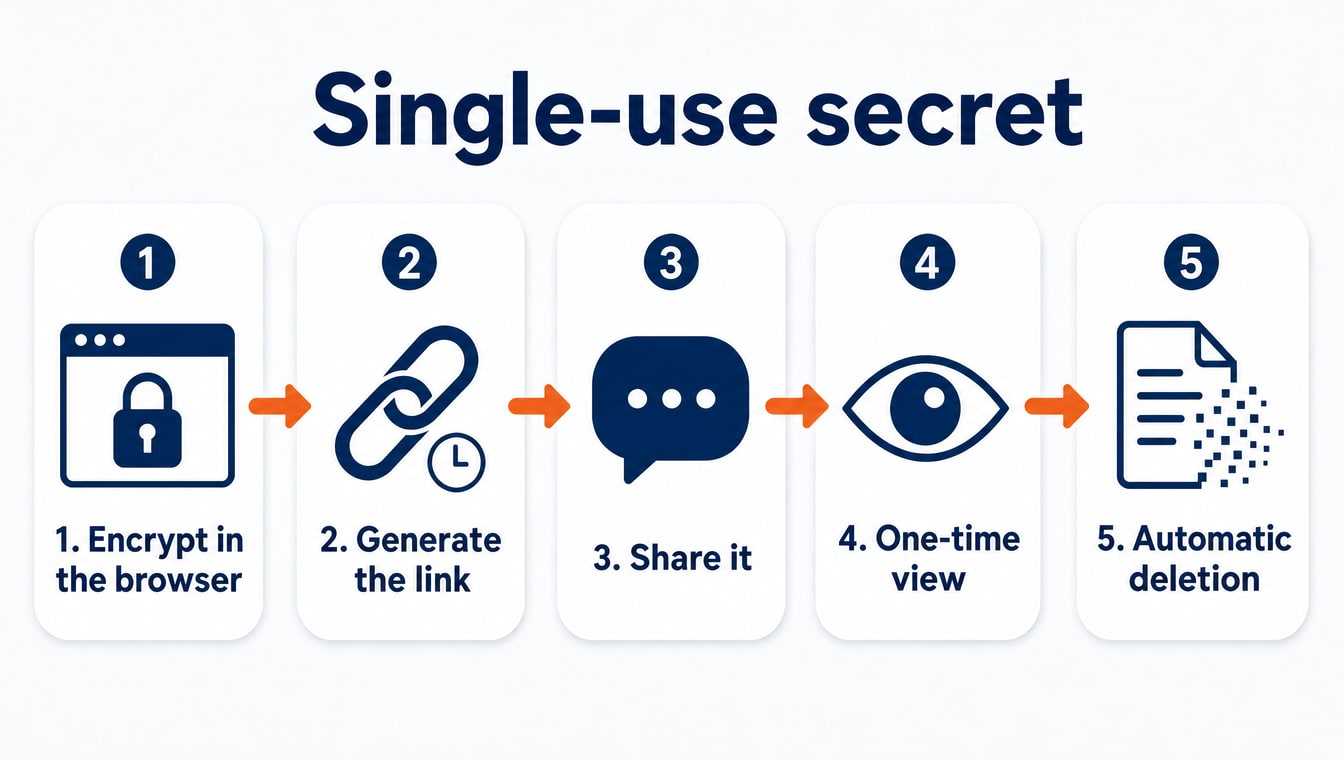
This design changes the security question. Instead of "who could have seen this password in the last two years?", the question becomes "was the link consumed by the right person within the time limit?". If the recipient opens the link and it has already been used, the leak is detected within minutes, and there is only one response: rotate the credential immediately. The exposure window drops from "forever" to the interval between creating and reading.
The pattern is mature in the industry. HashiCorp Vault implements the same idea as response wrapping: the secret is wrapped in a single-use token with its own lifetime, and whoever carries the token never sees the content. Tools like Onetime Secret, PrivateBin, Yopass and Bitwarden Send bring the same concept to the daily work of teams.
In-browser encryption: the server does not need to know the secret
The second piece of the design is where encryption happens. In good sharing services, the secret is encrypted in the sender's browser, before any upload, using the Web Crypto API built into modern browsers:
const key = await crypto.subtle.generateKey(
  { name: "AES-GCM", length: 256 },
  true,
  ["encrypt", "decrypt"]
);
const iv = crypto.getRandomValues(new Uint8Array(12));
const encryptedBlob = await crypto.subtle.encrypt(
  { name: "AES-GCM", iv },
  key,
  new TextEncoder().encode(secret)
);
// the encrypted blob goes to the server;
// the exported key goes in the URL fragment (#key)
The elegant detail is in the final link, which combines two parts with different destinations:
- The secret's identifier sits in the URL path and reaches the server.
- The decryption key sits in the fragment, after the
#. By specification, the browser never sends the fragment to the server: it exists only on the client side.
The result is a zero-knowledge service: the server stores an encrypted blob it cannot read, because the key exists only inside the link that traveled between sender and recipient. If the database leaks, if an administrator gets curious or if the provider is subpoenaed, there is no readable secret to hand over. TLS protects the path; in-browser encryption protects the destination.
Automatic expiration: every pending secret needs a deadline
A link that is created and never opened cannot wait forever. Automatic expiration is a requirement, not a feature:
- Short time limit by default. Between 15 minutes and 24 hours, depending on sensitivity. A staging access code can tolerate a day; the production database password cannot.
- The more sensitive, the shorter the limit. The ideal lifetime is "long enough for the recipient to open it", nothing more.
- No scheduled jobs to clean up. Managed databases do this on their own: DynamoDB TTL deletes expired items at no throughput cost, and Redis and Cloudflare Workers KV have native per-key expiration.
One technical detail separates serious implementations from naive ones: DynamoDB TTL does not guarantee deletion at the exact second of expiry (cleanup is asynchronous and can take hours). So the application also validates the deadline on read: if the item exists in the database but has expired, the response is "expired", never the content.
Deletion after first read
Immediate deletion is what turns a temporary link into a true one-time secret. Three implementation rules matter:
- Delivery and destruction in the same operation. The read must be atomic: the system deletes the record and returns the content in a single step (in DynamoDB, a
DeleteItemreturning the old values does this). That way, two people opening the link at the same time never get the secret twice. - A second read is an incident, not a 404 error. If someone opens an already consumed link, the system should alert the creator. This is the cheapest alarm there is: it means the link was intercepted somewhere along the way, and the credential needs to be rotated immediately.
- Do not confuse this with disappearing messages. Deleting the message on WhatsApp or setting retention on Slack does not protect the content: the screenshot, the notification, the forward and the backup still exist. With a one-time secret, the value was never in the channel; what expires in the chat is just a dead link.
Access control and auditing
For most teams, a one-time link with expiration already removes most of the risk. When the secret is more critical, extra layers come into play:
- A protection passphrase agreed on another channel. The link goes through Slack; the passphrase goes by voice or another medium. Separating channels keeps the interception of a single medium from handing over full access.
- Verified recipient. Restrict reading to a specific email or domain, with verification before showing the content.
- Attempt limits and rate limiting. Long random identifiers make guessing unfeasible, and request limits cut off brute force and scanning.
- Audit the metadata, never the content. Record who created it, when, for whom, when it was read and from which address, without ever recording the secret. This trail answers compliance questions and shows due diligence in data handling, in line with what LGPD (Brazil's data protection law) calls accountability, without creating a new sensitive store.
It is worth reinforcing what the OWASP secrets management guide sets as the foundation: centralize management, automate rotation and apply least privilege. The one-time link solves transport; the permanent home of the secret is still the vault (1Password, Bitwarden, Vault or equivalent), with regular rotation. One does not replace the other.
Serverless architecture for low volume
The classic objection is "we are not going to maintain yet another system". The modern answer is that an internal one-time secrets service, for tens or hundreds of shares per month, needs no server:
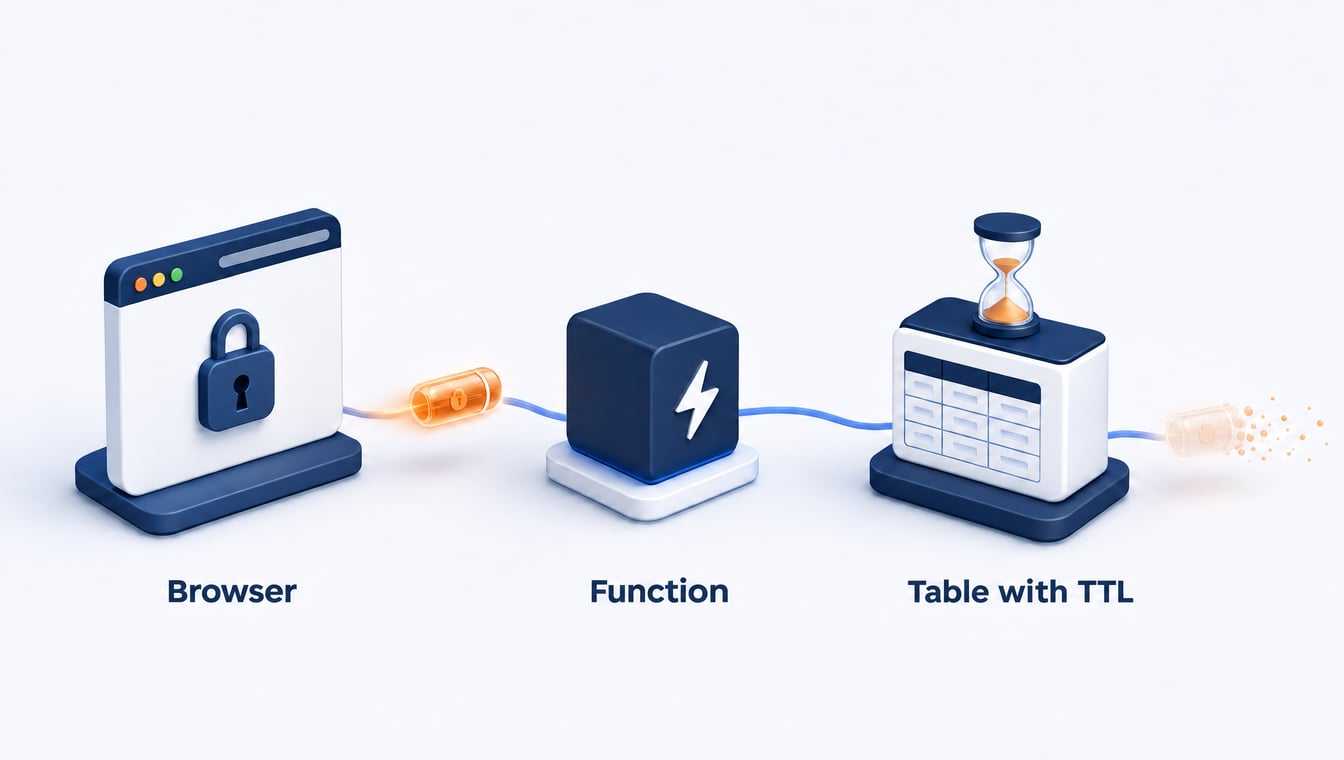
- Static front end hosted on S3 with CloudFront or Cloudflare Pages, responsible for encrypting and decrypting in the browser.
- One function (Lambda or Workers) with two routes: store the encrypted blob and consume the blob with atomic deletion.
- One table with TTL (DynamoDB or Workers KV) that deletes whatever expires on its own.
The advantages of this design for low volume are hard to beat:
| Aspect | Traditional server | Serverless with TTL |
|---|---|---|
| Monthly cost | Fixed, even when idle | Cents, close to zero |
| Maintenance | OS, patches, uptime | Only the function code |
| Data cleanup | Scheduled routines | Built into the database |
Minimum hardening fits in an afternoon: payload size limit, rate limiting, headers that forbid caching, metadata-only logs and your own domain (an address like secrets.yourcompany.com teaches the team to distrust any other sender, which reduces phishing). If you prefer not to write code, you can host an established open source tool, such as PrivateBin or Yopass, behind your own domain.
How to bring AI agents into the flow
AI agents read Slack, WhatsApp and email to carry out tasks: answer customers, open tickets, deploy, reconcile spreadsheets. Sooner or later, an agent runs into a credential along the way, and what it does at that moment decides whether the automation is a productivity gain or an incident waiting to happen.
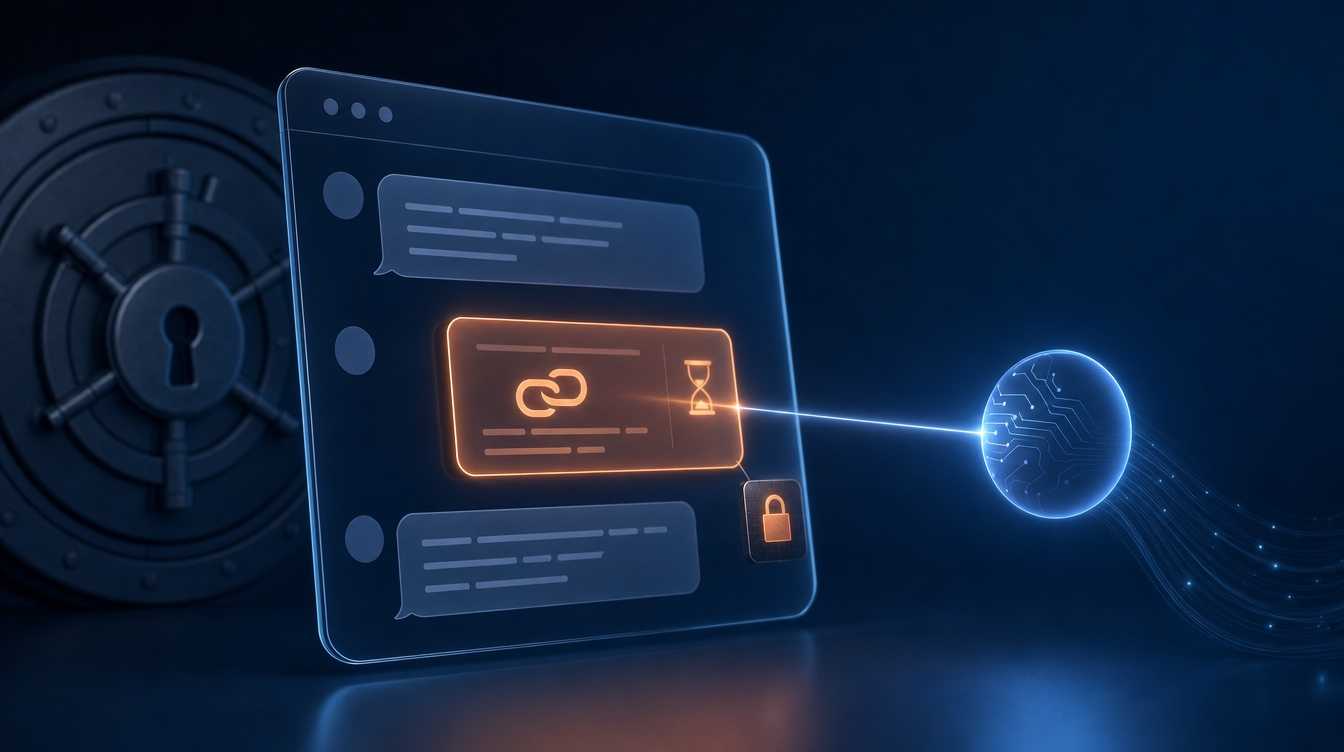
The risk has a name and a catalog entry: OWASP lists sensitive information disclosure (LLM02:2025) among the top ten risks of LLM applications. Everything that goes into the prompt can reappear in provider logs, conversation history, telemetry, agent memories and future answers. A prompt is as unsuitable a transport for passwords as chat, with the added problem of being processed and retained by third parties.
Five practical rules solve the integration:
- The agent receives a reference, never a value. The prompt carries a pointer (
op://vault/item, the ARN in Secrets Manager, the path in Vault), and the executor resolves the reference at run time, outside the model's context. The model orchestrates; the infrastructure injects the secret. - Automatic detection and redaction. Known credential patterns (prefixes like
AKIA,ghp_,sk-) are masked before any log, prompt or call to an external provider. It is the same discipline of sensitive data redaction we apply in RAG pipelines. - A secret found in the channel becomes a link, not an echo. If a human pastes a password into a channel the agent monitors, the right behavior for the agent is to never repeat the value in any reply, suggest rotation and, ideally, repackage the data as a one-time secret for the right recipient.
- Least privilege for the agent itself. Dedicated service accounts, minimal scope, short-lived tokens and never running under the personal account of whoever configured it. This applies to the Slack bot, to the WhatsApp Business integration and to every connected MCP server, as we detail in the delivery playbook for agents with MCP.
- Agent auditing is operator auditing. Every agent action that touches a credential goes into the same metadata trail as humans: which reference was resolved, when, for which task.
Here at X-Apps we work this way internally: our agents use 1Password service accounts with wrappers that inject credentials at run time, without the value appearing in a prompt, log or conversation history. The agent asks for "GitLab access"; the infrastructure delivers the authenticated session, never the password.
What should never appear in prompts, logs or tickets
The final list works as a pocket policy, ready to paste into the team's internal handbook:
| What | Where it usually leaks | What to do instead |
|---|---|---|
| Plain text password | Chat, ticket, task description | One-time link |
| API key and token | AI prompt, CI log, commit | Vault + reference resolved at runtime |
Full .env file | Chat attachment, handoff zip | Shared team vault |
| SSH/TLS private key | Email, USB stick, wiki | Generate at the destination; transport only the public key |
| 2FA/OTP code | Screenshot, forwarded message | Type it directly; never store it |
Three reinforcements that prevent relapse:
- A screenshot is text. Screenshots with secrets get indexed and become searchable by OCR in cloud photo galleries. A screenshot of a password is a leaked password with a timestamp.
- Tickets outlive the project. Ticketing systems keep history for years and usually have more readers than you would think. A credential in a ticket is a stockpile waiting for the next intruder.
- A CI log is public inside the company. Pipelines print variables with frightening ease. Secret scanning in the repository and variable masking in the runner are the minimum; the 64% of leaked secrets never revoked in the GitGuardian report show what happens without them.
Checklist to roll this out on your team
- Written policy: credentials do not travel in chat, tickets, email or prompts.
- Business password vault as the source of truth, with rotation.
- One-time channel available (ready-made tool or your own serverless service).
- Default expiration times defined by sensitivity.
- Single read with an alert to the creator on a second attempt.
- Secret scanning active in the repository and secret masking in CI.
- AI agents configured for references, with automatic redaction of credential patterns.
- Team trained: check the link's domain, report already consumed links, rotate whatever leaked.
Frequently asked questions
Is it safe to send a password over WhatsApp?
Transport is end-to-end encrypted, but the message persists on the device, in the backup (which is only end-to-end encrypted if the user turns it on) and in any screenshot or forward. For credentials, WhatsApp should carry only a one-time link that expires; never the value.
Ready-made tool or your own solution?
A ready-made tool (Bitwarden Send, PrivateBin or Yopass under your domain) solves it quickly when trust in the vendor is acceptable. Your own serverless solution pays off when you want a corporate domain, specific audit rules and zero marginal cost: it is three serverless components, as shown above.
Does a one-time link replace the password vault?
No. The vault is where the secret lives, with ongoing access control and rotation. The one-time link is how the secret crosses a boundary (to a client, a vendor, a new developer) without leaving a trace in the channel. One complements the other.
What if the password has already been pasted into the chat?
Rotate first, delete later. Deleting the message without changing the credential only hides the evidence: copies in backups, notifications and search still exist.
Conclusion
Sharing credentials securely does not require an expensive tool or bureaucracy: it requires flipping the format. The secret stays encrypted and ephemeral; the channel carries only a disposable link. With in-browser encryption, automatic expiration, deletion on first read and AI agents limited to references, Slack and WhatsApp go back to being what they should be: conversation channels, not improvised vaults.
This flow completes our series on handing over access properly: AWS, Google Play Console, Apple Developer, OpenAI Platform and SendGrid. In all of them, the rule is the same as in this guide: named access, least privilege and a secret that never appears in the clear along the way.
Need AI automations that respect your credentials?
X-Apps designs and builds integrations, AI agents and complete applications with end-to-end secrets governance: vaults, service accounts, automatic redaction and an audit trail from the very first access.
References
- OWASP Secrets Management Cheat Sheet
- OWASP GenAI: LLM02:2025 Sensitive Information Disclosure
- GitGuardian: The State of Secrets Sprawl 2026
- Verizon: Data Breach Investigations Report
- HashiCorp Vault: Response Wrapping
- MDN: Web Crypto API
- AWS: Time to Live (TTL) in DynamoDB
- Bitwarden Send
- WhatsApp Security